|
|
马上注册,结交更多好友,享用更多功能^_^
您需要 登录 才可以下载或查看,没有账号?立即注册
x
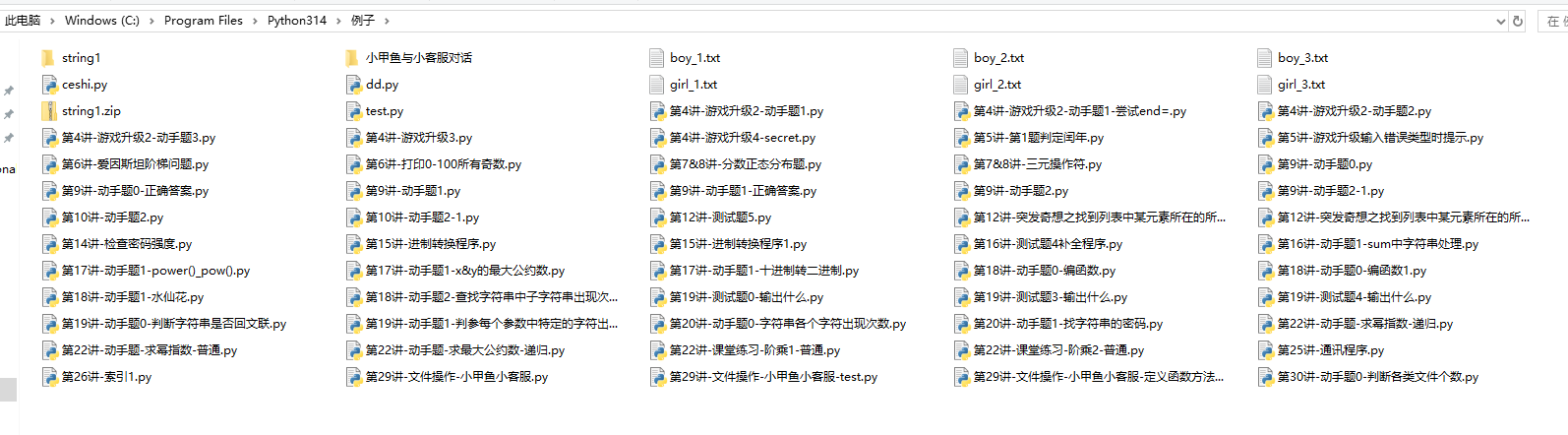
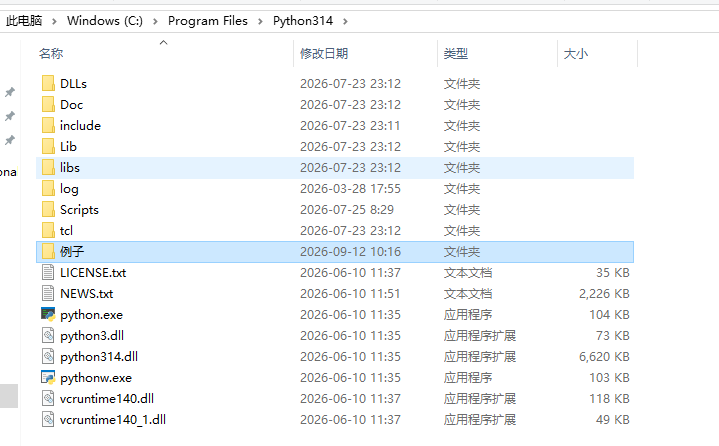
如附件是当前路径和上一路径截图。
1、用参考答案试了下,能正确显示:
代码:
import os
all_files = os.listdir(os.curdir) # 使用os.curdir表示当前目录更标准
type_dict = dict()
for each_file in all_files:
if os.path.isdir(each_file):
type_dict.setdefault('文件夹', 0)
type_dict['文件夹'] += 1
else:
ext = os.path.splitext(each_file)[1]
type_dict.setdefault(ext, 0)
type_dict[ext] += 1
for each_type in type_dict.keys():
print('该文件夹下共有类型为【%s】的文件 %d 个' % (each_type, type_dict[each_type]))
运行结果正确:
该文件夹下共有类型为【.txt】的文件 6 个
该文件夹下共有类型为【.py】的文件 56 个
该文件夹下共有类型为【文件夹】的文件 2 个
该文件夹下共有类型为【.zip】的文件 1 个
2.但是我做了一个小改动,是判断上一路径
代码:
import os
all_files = os.listdir(os.pardir) # 使用os.curdir表示当前目录更标准
type_dict = dict()
for each_file in all_files:
if os.path.isdir(each_file):
type_dict.setdefault('文件夹', 0)
type_dict['文件夹'] += 1
else:
ext = os.path.splitext(each_file)[1]
type_dict.setdefault(ext, 0)
type_dict[ext] += 1
for each_type in type_dict.keys():
print('该文件夹下共有类型为【%s】的文件 %d 个' % (each_type, type_dict[each_type]))
运行结果:
该文件夹下共有类型为【】的文件 9 个
该文件夹下共有类型为【.txt】的文件 2 个
该文件夹下共有类型为【.exe】的文件 2 个
该文件夹下共有类型为【.dll】的文件 4 个
问题:为什么文件夹几个字没有显示出来。
问题出在这一句: os.path.isdir(each_file)
os.listdir(os.pardir) 只拿到了上一级目录里的“名字”,例如 'abc'。但 os.path.isdir('abc') 检查的是“当前目录”下有没有 'abc' 这个文件夹,而不是“上一级目录”下。
所以上一级目录里的文件夹没有被识别成文件夹,全部进入了 else 分支。文件夹一般没有扩展名,经过 os.path.splitext 后扩展名是空字符串 '',于是就被统计成了【】。
正确做法是:判断上一级目录时,要把文件名和 os.pardir 拼接起来再判断。
- import os
- all_files = os.listdir(os.pardir)
- type_dict = dict()
- for each_file in all_files:
- full_path = os.path.join(os.pardir, each_file)
- if os.path.isdir(full_path):
- type_dict.setdefault('文件夹', 0)
- type_dict['文件夹'] += 1
- else:
- ext = os.path.splitext(each_file)[1]
- type_dict.setdefault(ext, 0)
- type_dict[ext] += 1
- for each_type in type_dict:
- print('该文件夹下共有类型为【%s】的文件 %d 个' % (each_type, type_dict[each_type]))
另外提醒一下:你贴的代码里 type_dict += 1 其实是会报错的,正确写法应该是 type_dict['文件夹'] += 1 或 type_dict[ext] += 1。
以上回复来自 FishC AI 小助理,如未能正确解答您的问题,请继续追问。
|
-
当前路径
-
上一路径
|
 ( 粤ICP备18085999号-1 | 粤公网安备 44051102000585号)


 狗仔卡
狗仔卡 发表于
发表于  置顶卡
置顶卡 千斤顶
千斤顶 显身卡
显身卡
 发表于
发表于  楼主
楼主