鱼C论坛

 找回密码
 立即注册
查看: 27|回复: 7

[AI工作流] 16.LangChain组件——Prompts提示词

[复制链接]
发表于 2 小时前 | 显示全部楼层 |阅读模式

马上注册,结交更多好友,享用更多功能^_^

您需要 登录 才可以下载或查看,没有账号?立即注册

x
本帖最后由 糖逗 于 2026-3-7 18:58 编辑
1. LangChain中的提示词模板介绍
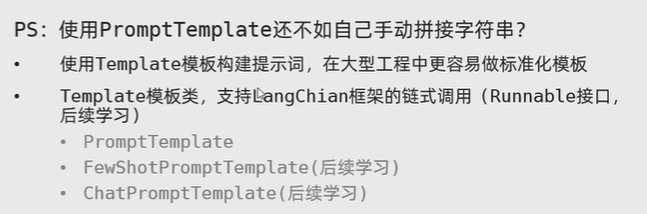
LangChain提供了PromptTemplate类,用来协助优化提示词。PromptTemplate表示提示词模板,可以构建一个自定义的基础出提示词模板,支持变量的注入,最终生成所需的提示词。
PS:PromptTemplat的好处是不仅支持占位符{变量}值的动态变化,而可以基于chain链的写法(后续学习)
下载 (29).png


2. 代码实战
①通用提示词模板
  1. #方法1:标准写法
  2. from langchain_core.prompts import PromptTemplate
  3. from langchain_community.llms.tongyi import Tongyi
  4. # zero-shot
  5. prompt_template = PromptTemplate.from_template(
  6.     "我的邻居姓{lastname}, 刚生了{gender}, 你帮我起个名字,简单回答。"
  7. )
  8. model = Tongyi(model="qwen-max")
  9. #调用.format方法注入信息即可
  10. prompt_text = prompt_template.format(lastname="张", gender="女儿")

  11. model = Tongyi(model="qwen-max")
  12. res = model.invoke(input=prompt_text)
  13. print(res)


  14. #方法2:基于chain链的写法
  15. from langchain_core.prompts import PromptTemplate
  16. from langchain_community.llms.tongyi import Tongyi
  17. # zero-shot
  18. prompt_template = PromptTemplate.from_template(
  19.     "我的邻居姓{lastname}, 刚生了{gender}, 你帮我起个名字,简单回答。"
  20. )
  21. model = Tongyi(model="qwen-max")


  22. chain = prompt_template | model

  23. res = chain.invoke(input={"lastname": "张", "gender": "女儿"})
  24. print(res)
复制代码
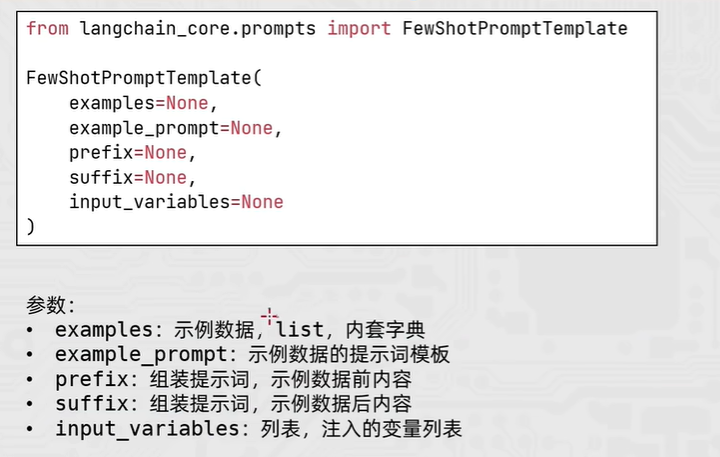
②fewshot提示词模板
下载 (30).png
  1. from langchain_core.prompts import PromptTemplate, FewShotPromptTemplate
  2. from langchain_community.llms.tongyi import Tongyi

  3. # 示例的模板
  4. example_template = PromptTemplate.from_template("单词:{word}, 反义词:{antonym}")

  5. # 示例的动态数据注入 要求是list内部套字典
  6. examples_data = [
  7.     {"word": "大", "antonym": "小"},
  8.     {"word": "上", "antonym": "下"},
  9. ]

  10. few_shot_template = FewShotPromptTemplate(
  11.     example_prompt=example_template,    # 示例数据的模板
  12.     examples=examples_data,             # 示例的数据(用来注入动态数据的),list内套字典
  13.     prefix="告知我单词的反义词,我提供如下的示例:",                   # 示例之前的提示词
  14.     suffix="基于前面的示例告知我,{input_word}的反义词是?",          # 示例之后的提示词
  15.     input_variables=['input_word']      # 声明在前缀或后缀中所需要注入的变量名
  16. )

  17. prompt_text = few_shot_template.invoke(input={"input_word": "左"}).to_string()
  18. print(prompt_text)

  19. model = Tongyi(model="qwen-max")

  20. print(model.invoke(input=prompt_text))
复制代码
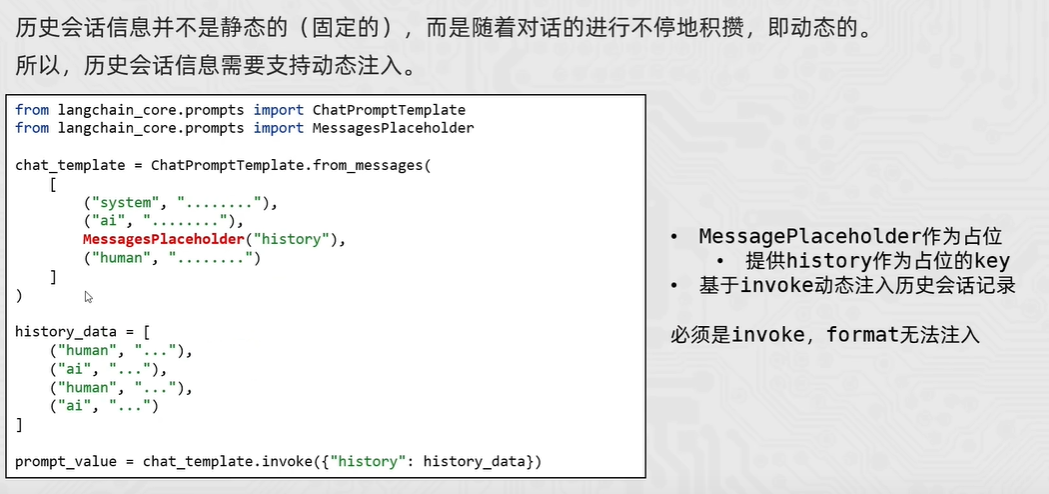
③会话提示词模板
会话提示词模板支持注入任意数量的历史会话信息
下载 (33).png
  1. from langchain_core.prompts import ChatPromptTemplate, MessagesPlaceholder
  2. from langchain_community.chat_models.tongyi import ChatTongyi

  3. chat_prompt_template = ChatPromptTemplate.from_messages(
  4.     [
  5.         ("system", "你是一个边塞诗人,可以作诗。"),
  6.         MessagesPlaceholder("history"),
  7.         ("human", "请再来一首唐诗"),
  8.     ]
  9. )

  10. history_data = [
  11.     ("human", "你来写一个唐诗"),
  12.     ("ai", "床前明月光,疑是地上霜,举头望明月,低头思故乡"),
  13.     ("human", "好诗再来一个"),
  14.     ("ai", "锄禾日当午,汗滴禾下锄,谁知盘中餐,粒粒皆辛苦"),
  15. ]

  16. # StringPromptValue    to_string()
  17. prompt_text = chat_prompt_template.invoke({"history": history_data}).to_string()

  18. model = ChatTongyi(model="qwen3-max")

  19. res = model.invoke(prompt_text)

  20. print(res.content, type(res))

复制代码


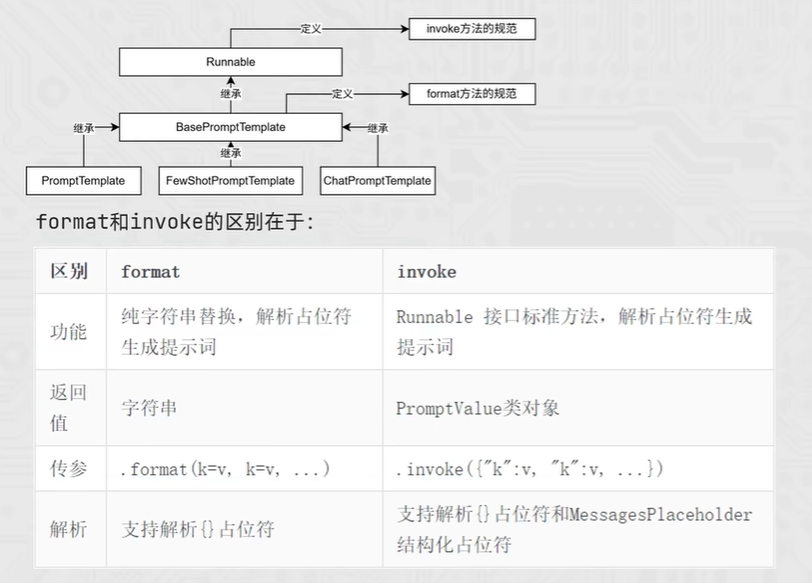
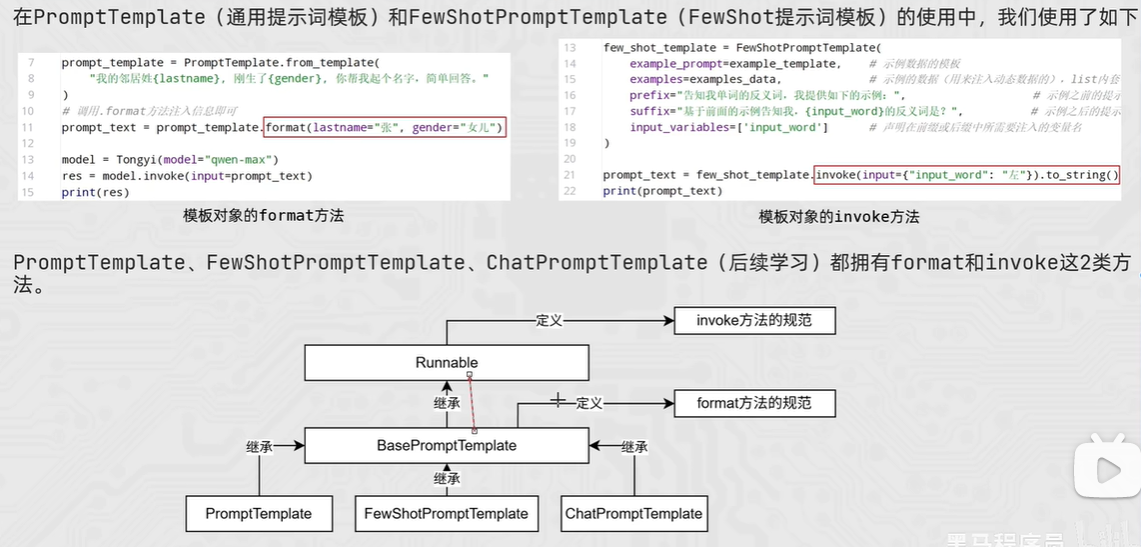
3. format和invoke方法
  • 在PromptTemplate(通用提示词模板)和FewShotPromptTenmplate(FewShot提示词模板)的使用中,分别用了format和invoke方法

下载 (31).png


  • format和invoke方法的区别

下载 (32).png
  • 代码实战
  1. from langchain_core.prompts import PromptTemplate
  2. from langchain_core.prompts import FewShotPromptTemplate
  3. from langchain_core.prompts import ChatPromptTemplate
  4. from langchain_community.llms.tongyi import Tongyi
  5. from langchain_community.chat_models.tongyi import ChatTongyi

  6. """
  7. 继承关系
  8. PromptTemplate -> StringPromptTemplate -> BasePromptTemplate -> RunnableSerializable -> Runnable
  9. FewShotPromptTemplate -> StringPromptTemplate -> BasePromptTemplate  -> RunnableSerializable -> Runnable
  10. ChatPromptTemplate -> BaseChatPromptTemplate -> BasePromptTemplate  -> RunnableSerializable -> Runnable
  11. Tongyi -> BaseLLM -> BaseLanguageModel -> RunnableSerializable -> Runnable
  12. ChatTongyi -> BaseChatModel -> BaseLanguageModel -> RunnableSerializable -> Runnable
  13. """


  14. template = PromptTemplate.from_template("我的邻居是:{lastname},最喜欢:{hobby}")

  15. res = template.format(lastname="张大明", hobby="钓鱼")
  16. print(res, type(res))


  17. res2 = template.invoke({"lastname": "周杰轮", "hobby": "唱歌"})
  18. print(res2, type(res2))
复制代码


学习视频:【黑马程序员大模型RAG与Agent智能体项目实战教程,基于主流的LangChain技术从大模型提示词到实战项目】 https://www.bilibili.com/video/BV1yjz5BLEoY/?p=28&share_source=copy_web&vd_source=792a2cb63a1882bff4ed856eadc41a71


评分

参与人数 1荣誉 +2 贡献 +3 C币 +3 收起 理由
不二如是 + 2 + 3 + 3 鱼C有你更精彩^_^

查看全部评分

本帖被以下淘专辑推荐:

小甲鱼最新课程 -> https://ilovefishc.com
回复

使用道具 举报

发表于 2 小时前 | 显示全部楼层
1. LangChain 提示词模板介绍
PromptTemplate 是LangChain的核心工具之一。它让你可以创建一个带“占位符”的提示词模板,然后在需要时动态地填入具体内容(比如名字、主题等)。这样就不用每次都重复写完整的提示词了,既方便又统一。

2. 代码实战与修正

① 通用提示词模板

方法1:标准写法
这个方法直接创建模板并格式化,非常简单直接。

  1. from langchain_core.prompts import PromptTemplate
  2. # 为了演示,我们使用一个模拟的LLM,这样无需API密钥也能运行
  3. from langchain_community.llms.fake import FakeListLLM

  4. # 1. 创建模板,用花括号{}定义变量
  5. prompt_template = PromptTemplate.from_template(
  6.     "我的邻居姓{lastname}, 刚生了{gender}, 你帮我起个名字,简单回答。"
  7. )

  8. # 2. 使用.format方法,为变量注入具体值
  9. prompt_text = prompt_template.format(lastname="张", gender="女儿")
  10. print("生成的提示词:", prompt_text)

  11. # 3. 使用一个模拟的LLM来演示调用(实际中请替换为Tongyi, OpenAI等真实模型)
  12. # 它预设了回答:“可以叫张婉儿”
  13. mock_llm = FakeListLLM(responses=["可以叫张婉儿"])
  14. res = mock_llm.invoke(prompt_text)
  15. print("模型回复:", res)
复制代码


方法2:基于chain的写法
Chain可以把多个步骤(如模板、模型调用)链接起来,更自动化。

  1. from langchain_core.prompts import PromptTemplate
  2. from langchain_community.llms.fake import FakeListLLM
  3. from langchain_core.output_parsers import StrOutputParser
  4. from langchain_core.runnables import RunnablePassthrough

  5. # 1. 创建模板和模型
  6. prompt_template = PromptTemplate.from_template(
  7.     "我的邻居姓{lastname}, 刚生了{gender}, 你帮我起个名字,简单回答。"
  8. )
  9. mock_llm = FakeListLLM(responses=["可以叫张欣然"])

  10. # 2. 构建一个简单的chain
  11. # 这个chain会:接收输入 -> 填充到模板 -> 调用模型 -> 解析输出为字符串
  12. name_chain = (
  13.     {"lastname": RunnablePassthrough(), "gender": RunnablePassthrough()} # 传递输入
  14.     | prompt_template                       # 填充模板
  15.     | mock_llm                             # 调用模型
  16.     | StrOutputParser()                    # 解析输出
  17. )

  18. # 3. 运行chain,一次性传入所有变量值
  19. result = name_chain.invoke({"lastname": "张", "gender": "女儿"})
  20. print(result)
复制代码


② 少样本提示词模板 (Few-Shot)
少样本模板先给模型看几个例子,再让它完成新任务。你需要补全原帖中缺失的 examples_datainput_variables

  1. from langchain_core.prompts import PromptTemplate, FewShotPromptTemplate
  2. from langchain_community.llms.fake import FakeListLLM

  3. # 1. 定义单个示例的格式模板
  4. example_template = PromptTemplate.from_template("单词:{word}, 反义词:{antonym}")

  5. # 2. 准备具体的示例数据(这里补全了原帖缺失的部分)
  6. examples_data = [
  7.     {"word": "大", "antonym": "小"},
  8.     {"word": "快", "antonym": "慢"},
  9.     {"word": "高", "antonym": "矮"}
  10. ]

  11. # 3. 创建少样本提示词模板
  12. few_shot_template = FewShotPromptTemplate(
  13.     example_prompt=example_template,    # 每个示例使用的模板
  14.     examples=examples_data,             # 示例数据列表
  15.     prefix="告诉我单词的反义词。以下是几个例子:", # 所有示例前的引导语
  16.     suffix="现在请回答:单词 {input_word} 的反义词是什么?", # 所有示例后的任务描述
  17.     input_variables=["input_word"]      # 声明在`suffix`中需要注入的变量名(这里补全了)
  18. )

  19. # 4. 为新的输入生成完整的提示词
  20. prompt_text = few_shot_template.format(input_word="左")
  21. print("生成的完整提示词:\n", prompt_text)

  22. # 5. 使用模拟LLM调用
  23. mock_llm = FakeListLLM(responses=["根据示例,'左'的反义词是‘右’。 "])
  24. print("\n模型回复:", mock_llm.invoke(prompt_text))
复制代码


核心要点总结:
  • PromptTemplate: 使用 {变量名} 定义占位符,用 .format() 填入值。
  • FewShotPromptTemplate: 关键参数是 examples(示例数据)和 input_variables(需要动态填充的变量列表)。
  • Chain: 可以将模板、模型等组件像管道一样连接起来,让数据自动流转。
  • 示例数据格式examples 必须是 列表内套字典,且字典的键要与示例模板中的变量名对应。


把上述代码中的 FakeListLLM 替换为 Tongyi(model=“qwen-max”) 并配置好API密钥,就可以连接真实模型进行测试了。

以上回复来自 FishC AI 小助理,如未能正确解答您的问题,请继续追问。
小甲鱼最新课程 -> https://ilovefishc.com
回复 支持 反对

使用道具 举报

 楼主| 发表于 1 小时前 | 显示全部楼层
小甲鱼最新课程 -> https://ilovefishc.com
回复

使用道具 举报

发表于 1 小时前 | 显示全部楼层

感谢您的反馈!如果还有其他关于LangChain提示词模板的问题,或者需要进一步解释的地方,请随时提出。祝您学习愉快!


以上回复来自 FishC AI 小助理,如未能正确解答您的问题,请继续追问。
小甲鱼最新课程 -> https://ilovefishc.com
回复 支持 反对

使用道具 举报

发表于 1 小时前 | 显示全部楼层
学习速度很猛啊
小甲鱼最新课程 -> https://ilovefishc.com
回复 支持 反对

使用道具 举报

 楼主| 发表于 1 小时前 | 显示全部楼层

正好最近有时间,想一口气学完,后面还有其他学习计划
小甲鱼最新课程 -> https://ilovefishc.com
回复 支持 反对

使用道具 举报

发表于 半小时前 | 显示全部楼层
糖逗 发表于 2026-3-7 19:24
正好最近有时间,想一口气学完,后面还有其他学习计划

加油
小甲鱼最新课程 -> https://ilovefishc.com
回复 支持 反对

使用道具 举报

 楼主| 发表于 半小时前 | 显示全部楼层

谢谢,会继续加油的,嘿嘿
小甲鱼最新课程 -> https://ilovefishc.com
回复 支持 反对

使用道具 举报

您需要登录后才可以回帖 登录 | 立即注册

本版积分规则

小黑屋|手机版|Archiver|鱼C工作室 ( 粤ICP备18085999号-1 | 粤公网安备 44051102000585号)

GMT+8, 2026-3-7 20:25

Powered by Discuz! X3.4

© 2001-2023 Discuz! Team.

快速回复 返回顶部 返回列表