|
|
马上注册,结交更多好友,享用更多功能^_^
您需要 登录 才可以下载或查看,没有账号?立即注册
x
- import easygui
- import urllib.request
- msg = '请填写喵的尺寸'
- title = '下载一只喵'
- fieldNames = ['宽:', '高:']
- fieldValues = [] # start with blanks for the values
- fieldValues = easygui.multenterbox(msg, title, fieldNames, (400, 600))
- # make sure that none of the fields was left blank
- while 1:
- if fieldValues == None:
- break
- errmsg = ""
- for i in range(len(fieldNames)):
- if fieldValues[i].strip() == "":
- errmsg = errmsg + ('"%s"is a required field.\n\n' % fieldNames[i])
- if errmsg == "":
- break # no problems found
- fieldValues = multenterbox(errmsg, title, fieldNames, fieldValues)
- # choose a directory to save the picture
- msg = '请选择存放喵的文件夹'
- path = easygui.diropenbox(msg)
- if path:
- filename = '%s/cat.jpg' % path
- else:
- filename = 'cat.jpg'
- print(filename)
- url = "http://placekitten/g/400/600"
- response = urllib.request.urlopen(url)
- cat_img = response.read()
- with open(filename, 'wb') as f:
- f.write(cat_img)
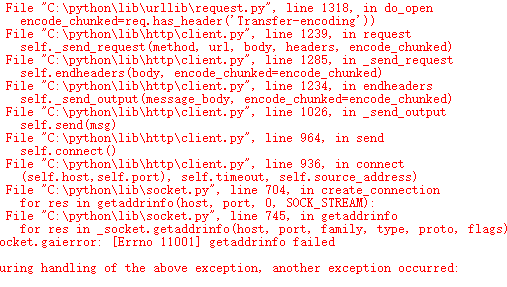
报了好多错,全是像底层库里边的错,看不懂。
|
|
 ( 粤ICP备18085999号-1 | 粤公网安备 44051102000585号)


 狗仔卡
狗仔卡 发表于 2018-3-9 15:47:51
 置顶卡
置顶卡 千斤顶
千斤顶 显身卡
显身卡 楼主
楼主 发表于 2018-3-9 15:54:26
