鱼C论坛

 找回密码
 立即注册
查看: 1055|回复: 2

[已解决]Python文本处理

[复制链接]
发表于 2018-4-10 17:37:10 | 显示全部楼层 |阅读模式

马上注册,结交更多好友,享用更多功能^_^

您需要 登录 才可以下载或查看,没有账号?立即注册

x
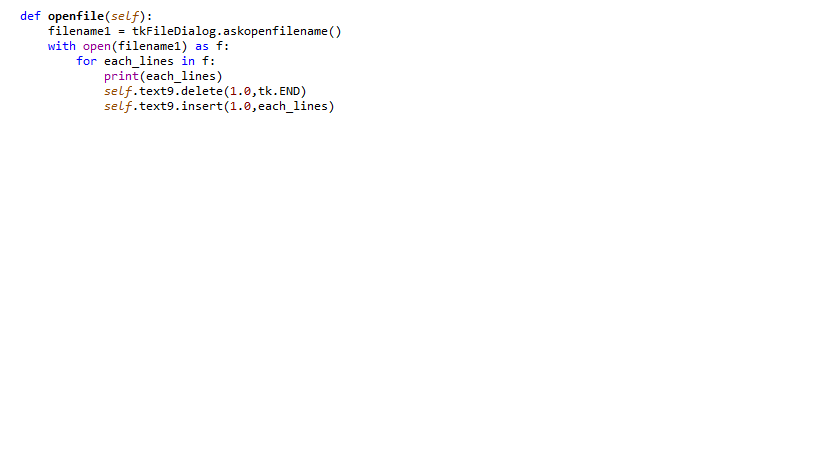
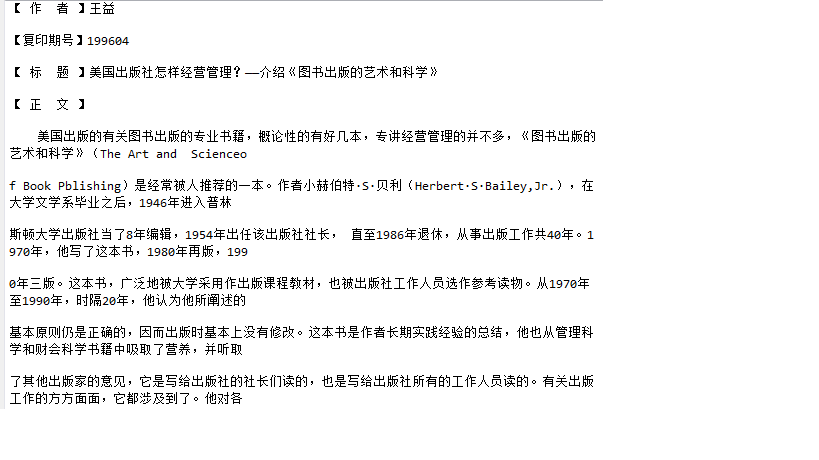
如何将右边窗口显示的文字通过Tkinter模块的text控件显示。
无标题.png 无标题1.png ,现在文本内容只能在运行结果窗口显示。

请大家帮帮忙,谢谢大家
最佳答案
2018-4-10 19:07:42
from tkinter import *
from tkinter import filedialog

root = Tk()

def openfile(text):
    filename1 = filedialog.askopenfilename()
    with open(filename1) as f:
        for each_lines in f:
            text.insert(1.0,each_lines)

            
text = Text(root)
text.pack()

openfile(text)


mainloop()
小甲鱼最新课程 -> https://ilovefishc.com
回复

使用道具 举报

发表于 2018-4-10 19:07:42 | 显示全部楼层    本楼为最佳答案   
from tkinter import *
from tkinter import filedialog

root = Tk()

def openfile(text):
    filename1 = filedialog.askopenfilename()
    with open(filename1) as f:
        for each_lines in f:
            text.insert(1.0,each_lines)

            
text = Text(root)
text.pack()

openfile(text)


mainloop()
小甲鱼最新课程 -> https://ilovefishc.com
回复 支持 反对

使用道具 举报

 楼主| 发表于 2018-4-11 19:34:45 | 显示全部楼层
谢谢!
小甲鱼最新课程 -> https://ilovefishc.com
回复

使用道具 举报

您需要登录后才可以回帖 登录 | 立即注册

本版积分规则

小黑屋|手机版|Archiver|鱼C工作室 ( 粤ICP备18085999号-1 | 粤公网安备 44051102000585号)

GMT+8, 2026-3-10 11:33

Powered by Discuz! X3.4

© 2001-2023 Discuz! Team.

快速回复 返回顶部 返回列表