|
|
马上注册,结交更多好友,享用更多功能^_^
您需要 登录 才可以下载或查看,没有账号?立即注册
x
import matplotlib.pyplot as plt
import numpy as np
import os
import tensorflow as tf
from object_detection.utils import label_map_util
from object_detection.utils import visualization_utils as vis_util
from PIL import Image
def test():
#重置图
tf.reset_default_graph()
'''
载入模型以及数据集样本标签,加载待测试的图片文件
'''
#指定要使用的模型的路径 包含图结构,以及参数
PATH_TO_CKPT = 'E:/models/research/object_detection/flower_identification/export/frozen_inference_graph.pb'
#测试图片所在的路径
PATH_TO_TEST_IMAGES_DIR ='E:/models/research/object_detection/flower_identification/data/test'
TEST_IMAGE_PATHS = [os.path.join(PATH_TO_TEST_IMAGES_DIR,'image{}.jpg'.format(i)) for i in range(1,6) ]
#数据集对应的label mscoco_label_map.pbtxt文件保存了index到类别名的映射
PATH_TO_LABELS = os.path.join('E:/models/research/object_detection/flower_identification/data', 'label_map.pbtxt')
NUM_CLASSES = 2
#重新定义一个图
output_graph_def = tf.GraphDef()
with tf.gfile.GFile(PATH_TO_CKPT,'rb') as fid:
#将*.pb文件读入serialized_graph
serialized_graph = fid.read()
#将serialized_graph的内容恢复到图中
output_graph_def.ParseFromString(serialized_graph)
#print(output_graph_def)
#将output_graph_def导入当前默认图中(加载模型)
tf.import_graph_def(output_graph_def,name='')
print('模型加载完成')
#载入coco数据集标签文件
label_map = label_map_util.load_labelmap(PATH_TO_LABELS)
categories = label_map_util.convert_label_map_to_categories(label_map,max_num_classes = NUM_CLASSES,use_display_name = True)
category_index = label_map_util.create_category_index(categories)
'''
定义session
'''
def load_image_into_numpy_array(image):
'''
将图片转换为ndarray数组的形式
'''
im_width,im_height = image.size
return np.array(image.getdata()).reshape((im_height,im_width,3)).astype(np.uint0)
#设置输出图片的大小
IMAGE_SIZE = (8,6)
#使用默认图,此时已经加载了模型
detection_graph = tf.get_default_graph()
with tf.Session(graph=detection_graph) as sess:
for image_path in TEST_IMAGE_PATHS:
image = Image.open(image_path)
#将图片转换为numpy格式
image_np = load_image_into_numpy_array(image)
'''
定义节点,运行并可视化
'''
#将图片扩展一维,最后进入神经网络的图片格式应该是[1,?,?,3]
image_np_expanded = np.expand_dims(image_np,axis = 0)
'''
获取模型中的tensor
'''
image_tensor = detection_graph.get_tensor_by_name('image_tensor:0')
#boxes用来显示识别结果
boxes = detection_graph.get_tensor_by_name('detection_boxes:0')
#Echo score代表识别出的物体与标签匹配的相似程度,在类型标签后面
scores = detection_graph.get_tensor_by_name('detection_scores:0')
classes = detection_graph.get_tensor_by_name('detection_classes:0')
num_detections = detection_graph.get_tensor_by_name('num_detections:0')
#开始检查
boxes,scores,classes,num_detections = sess.run([boxes,scores,classes,num_detections],
feed_dict={image_tensor:image_np_expanded})
#可视化结果
vis_util.visualize_boxes_and_labels_on_image_array(
image_np,
np.squeeze(boxes),
np.squeeze(classes).astype(np.int32),
np.squeeze(scores),
category_index,
use_normalized_coordinates=True,
line_thickness=8)
plt.figure(figsize=IMAGE_SIZE)
print(type(image_np))
print(image_np.shape)
image_np = np.array(image_np,dtype=np.uint8)
plt.imshow(image_np)
if __name__ == '__main__':
test()
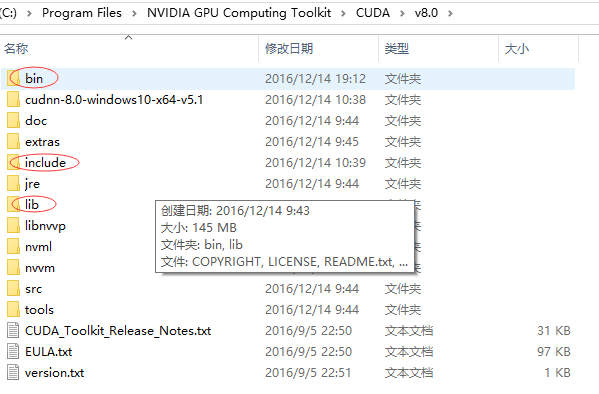
该代码运行时出现下面错误
ImportError: Could not find 'cudnn64_7.dll'. TensorFlow requires that this DLL be installed in a directory that is named in your %PATH% environment variable. Note that installing cuDNN is a separate step from installing CUDA, and this DLL is often found in a different directory from the CUDA DLLs. You may install the necessary DLL by downloading cuDNN 7 from this URL: https://developer.nvidia.com/cudnn
怎么解决
|
|
 ( 粤ICP备18085999号-1 | 粤公网安备 44051102000585号)


 狗仔卡
狗仔卡 发表于 2018-10-25 17:15:21
 置顶卡
置顶卡 千斤顶
千斤顶 显身卡
显身卡 发表于 2018-10-25 17:19:00
 楼主
楼主