|
|
马上注册,结交更多好友,享用更多功能^_^
您需要 登录 才可以下载或查看,没有账号?立即注册
x
想做一个小东西,如下图,,
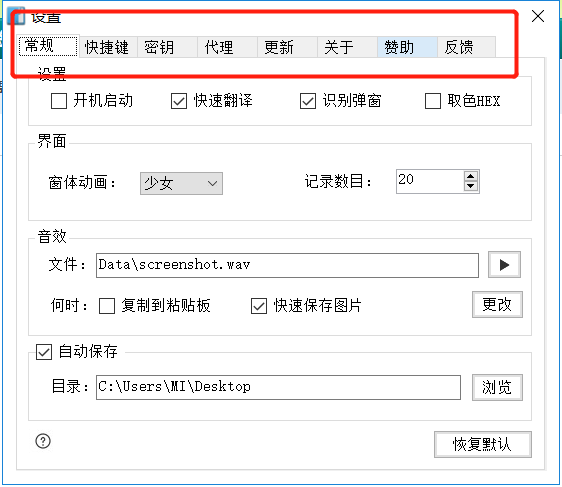
具体是按一下上面的按钮会切换出不同的页面,,
这个用wxpython 能实现吗,,,用什么方法
谢谢
我的代码是
- def My_Gui(file):
- __author__ = '考拉熊'
- import wx
- class DirDialog(wx.Frame):
- def __init__(self):
- global text_t
- wx.Frame.__init__(self, None, -1, u"-电话查询-", size=(780, 600), pos=(620, 200),
- style=wx.DEFAULT_FRAME_STYLE | wx.STAY_ON_TOP)
- self.pane = wx.Panel(self, -1, pos=(520, 200))
- # panels = wx.Panel(self, -1, pos=(520, 200))
- wx.Button(self.pane, 3, "查询", pos=(0, 0))
- wx.Button(self.pane, 4, "下载", pos=(153,
- self.Bind(wx.EVT_BUTTON, self.ChanXun, id=3)
- self.Bind(wx.EVT_BUTTON, self.XiaZai, id=4)
- wx.Frame.Show(self, ) # 显示窗口
- def XiaZai(self,event):
- print('00000')
- def ChanXun(self,event):
- self.panel = wx.Panel(self, 1, pos=(320, 200))
- self.userid = wx.TextCtrl(self.panel, -1, size=(290, 35), pos=(180, 50))
- wx.StaticText(self.panel, 2, "请输入号码", pos=(280, 20))
- text_t = wx.TextCtrl(self.panel, size=(420, 335), pos=(180, 120), style=
- wx.TE_READONLY | wx.TE_MULTILINE)
- font = wx.Font(15, wx.FONTFAMILY_DEFAULT, wx.FONTSTYLE_NORMAL, wx.FONTWEIGHT_BOLD)
- text_t.SetFont(font)
- self.userid.SetFont(font)
- text = wx.StaticText(self.panel, 2, "考拉熊",
- pos=(310, 480), style=wx.TE_CENTER)
- text.SetForegroundColour('#FF7F00')
- denglu = wx.Button(self.panel, 2, "查询", pos=(480, 50))
- self.Bind(wx.EVT_BUTTON, self.OnButton, id=2)
- wx.Frame.Show(self, ) # 显示窗口
- def OnButton(self, event):
- userid = self.userid.GetValue()
- try:
- if len(userid) > 5:
- huoqu(int(userid))
- else:
- wx.MessageBox('请输入正确的号码:')
- except:
- wx.MessageBox('请输入号码:')
- apps = wx.App()
- DirDialog()
- apps.MainLoop()
- My_Gui('测试')
|
|
 ( 粤ICP备18085999号-1 | 粤公网安备 44051102000585号)


 狗仔卡
狗仔卡 发表于 2018-12-30 15:25:03
 置顶卡
置顶卡 千斤顶
千斤顶 显身卡
显身卡 发表于 2019-7-27 10:36:34