|
|

楼主 |
发表于 2019-2-24 15:04:05
|
显示全部楼层
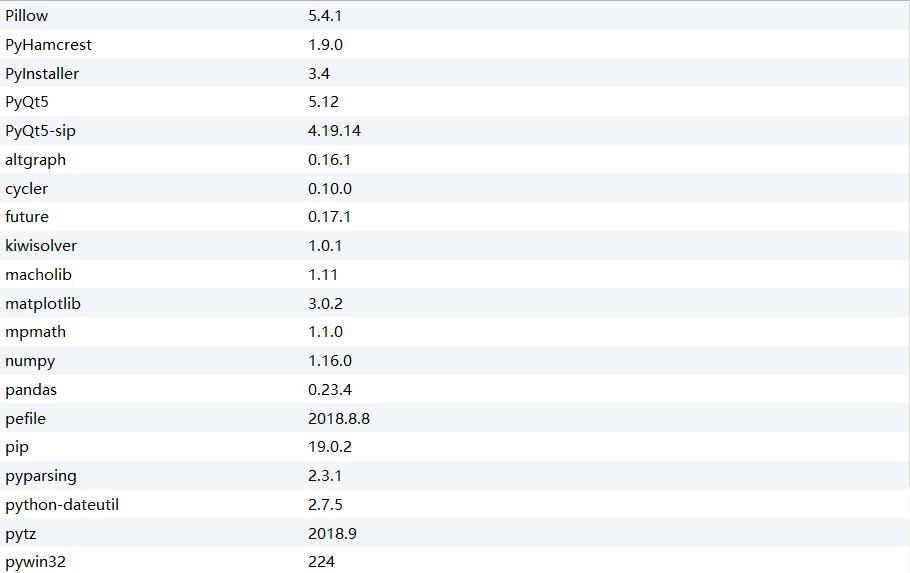
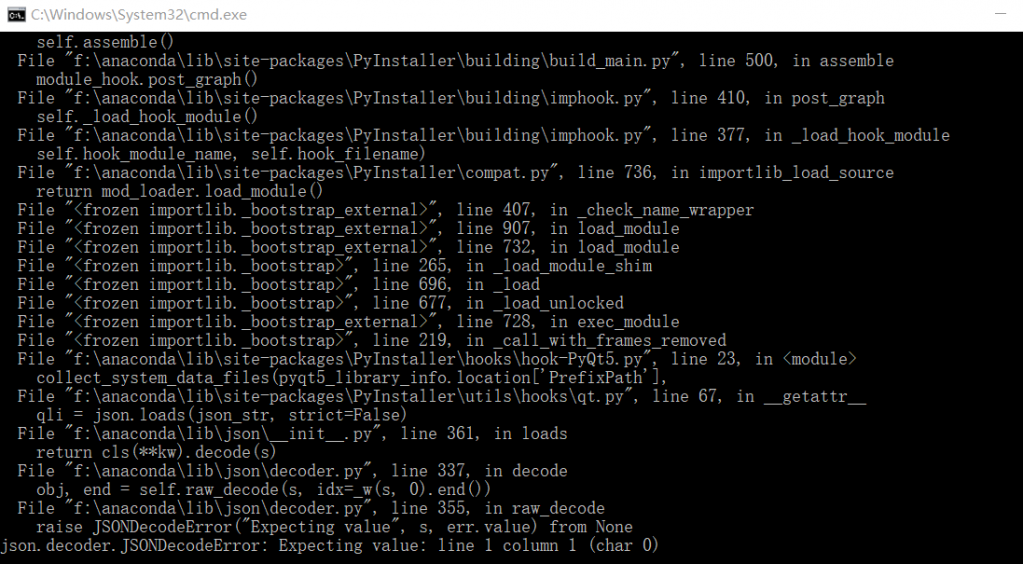
版主 你好 这是我的源代码 里面并没有涉及JSOND的模块,而且在pycharm中运行很好,但是利用cmd生成exe文件时出现了这样的问题,可以看一下吗?谢谢
- #coding=utf-8
- from tkinter import *
- import matplotlib.pyplot as plt
- from scipy import *
- import numpy as np
- from mpl_toolkits.mplot3d import Axes3D
- window = Toplevel()
- window.title('一元函数绘图')
- window.geometry('700x700')
- sb = Scrollbar(window)
- sb.place(x=680,y=300,height=400)
- t=Text(window, width=84,font=('NewTimesRoman', 11),yscrollcommand = sb.set)
- t.place(y=300, anchor='nw',height=400)
- sb.config(command=t.yview)
- def Cal_clr():
- t.delete(1.0, END)
- def clr():
- e1.delete('0', 'end')
- e2.delete('0', 'end')
- e3.delete('0', 'end')
- t.delete(1.0, END)
- def Cal():
- Cal_clr()
- fig = plt.figure()
- ax = fig.add_subplot(111)
- func = str(e1.get())
- min = eval(e2.get())
- max = eval(e3.get())
- x = np.linspace(min,max)
- y = eval(func)
- ax.plot(x, y)
- #fig.show()
- fig.savefig("一元函数图.png")
- l1 = Label(window, text="一元函数绘图", font=('NewTimesRoman',20),width=20, height=1)
- l1.place(x=350, y=20, anchor='center')
- l3 = Label(window, text="请输入函数", font=('NewTimesRoman', 10),
- width=80, height=1,anchor=W)
- l3.place(x=15, y=45,)
- e1=Entry(window, show='', font = 'NewTimesRoman -20 bold', width=60)
- e1.place(x=355, y=80, anchor='center')
- l4 = Label(window, text="请输入x的取值范围(绘图的上下限)", font=('NewTimesRoman', 10),
- width=200, height=1,anchor = W)
- l4.place(x=15, y=115,)
- e2=Entry(window, show='', font = 'NewTimesRoman -20 bold', width=5)
- e2.place(x=80, y=150, anchor='center')
- e3=Entry(window, show='', font = 'NewTimesRoman -20 bold', width=5)
- e3.place(x=200, y=150, anchor='center')
- l4 = Label(window, text="注:1.输入函数的自变量为x\n 2.注意符号规范(乘号"
- "*、指数**、求余数%),乘号在表达式中不可省略,sin(x),log(x)等均要加括号",justify = LEFT, font=('NewTimesRoman', 8),
- width=200, height=3,anchor = W)
- l4.place(x=15, y=170,)
- l5 = Label(window, text="图片保存在与此软件同一文件夹下", font=('NewTimesRoman', 16),
- width=60, height=2,anchor = W)
- l5.place(x=15, y=250,)
- b = Button(window, text='绘图', width=8,command=Cal)
- b.place(x=200, y=230, anchor='center')
- b_clr = Button(window, text='清空', width=8, command=clr)
- b_clr.place(x=320, y=230, anchor='center')
- window.mainloop()
|
|
 ( 粤ICP备18085999号-1 | 粤公网安备 44051102000585号)


 狗仔卡
狗仔卡 发表于 2019-2-24 13:47:36
 置顶卡
置顶卡 千斤顶
千斤顶 显身卡
显身卡 发表于 2019-2-24 14:05:16