|
|
马上注册,结交更多好友,享用更多功能^_^
您需要 登录 才可以下载或查看,没有账号?立即注册
x
想要从网页里提取想要的部门和它的时间信息
- import urllib.request
- import urllib.parse
- headers = {
- 'Accept': 'image/gif, image/jpeg, image/pjpeg, application/x-ms-application, application/xaml+xml, application/x-ms-xbap, application/x-shockwave-flash, application/vnd.ms-excel, application/vnd.ms-powerpoint, application/msword, */*',
- 'Connection': 'Keep-Alive',
- 'Content-Length': '60',
- 'Content-Type': 'application/x-www-form-urlencoded',
- 'Cookie': 'ASPSESSIONIDCCTCTDBD=NLHPINNBKJPPOLILHDBLEKNN',
- 'Host': '10.1.6.10:5700',
- 'Referer': 'http://10.1.6.10:5700/Worker_Stat/ReturnDep_Stat.asp',
- 'User-Agent': 'Mozilla/4.0 (compatible; MSIE 7.0; Windows NT 10.0; WOW64; Trident/7.0; .NET4.0C; .NET4.0E; .NET CLR 2.0.50727; .NET CLR 3.0.30729; .NET CLR 3.5.30729; InfoPath.3)'
- }
- data = {}
- data['ST']='2019-6-1'
- data['ET']='2019-6-3'
- data['DepID']='262'
- data['button'] = '%E7%BB%9F%E8%AE%A1'
- data = urllib.parse.urlencode(data).encode('utf-8')
- url = 'http://10.1.6.10:5700/Worker_Stat/ReturnDep_Stat.asp'
- r = urllib.request.Request(url,headers=headers)
- res = urllib.request.urlopen(r,data)
- t = res.read()
- t = t.decode('utf-8')
- print(t)
获得的html中没有请求得到的部门和时间
下面是输出结果
- <!DOCTYPE html PUBLIC "-//W3C//DTD XHTML 1.0 Transitional//EN" "http://www.w3.org/TR/xhtml1/DTD/xhtml1-transitional.dtd">
- <html xmlns="http://www.w3.org/1999/xhtml">
- <head>
- <meta http-equiv="Content-Type" content="text/html; charset=utf-8" />
- <title>维修回笼统计(部门)</title>
- <link href="../css/table.css" rel="stylesheet" type="text/css" />
- <script language=javascript src=../month.js></script>
- <script language=javascript src=../com/func.js></script>
- <script language=javascript>
- function showdiv() {
- divWait.style.pixelTop = document.body.offsetHeight / 2 - parseInt(divWait.style.height) / 2+77;
- //divWait.style.pixelTop =document.body.clientHeight/ 2 - parseInt(divWait.style.height) / 2+77;
- divWait.style.pixelLeft = document.body.offsetWidth / 2 - parseInt(divWait.style.width) / 2;
- divWait.style.visibility = "visible";
- }
- function hidediv() {
- divWait.style.visibility = "hidden";
- }
- function showdiv2() {
- divWait2.style.pixelTop = document.body.offsetHeight / 2 - parseInt(divWait.style.height) / 2+77;
- divWait2.style.pixelLeft = document.body.offsetWidth / 2 - parseInt(divWait.style.width) / 2;
- divWait2.style.display = "";
- }
- </script>
- <DIV id=divWait style="visibility: hidden; WIDTH: 200px; POSITION: absolute; HEIGHT: 19px; BACKGROUND-COLOR: #ffffa3; fontSize: 10pt" align=center VALIGN="center">
- <table border=1 width="100%" style="border-collapse:collapse;">
- <tr style="BACKGROUND-COLOR: #ffffa3;"><td align=center ><img align=absmiddle src=../style/waitdiv3.gif> <b>数据查询中,请稍候……</b></td>
- </tr></table>
- </DIV>
- <DIV id=divWait2 style="display: none; WIDTH: 200px; POSITION: absolute; HEIGHT: 19px; BACKGROUND-COLOR: #ffffa3; fontSize: 10pt" align=center VALIGN="center">
- <table border=1 width="100%" style="border-collapse:collapse;">
- <tr style="BACKGROUND-COLOR: #ffffa3;"><td align=center ><img align=absmiddle src=../style/waitdiv3.gif> <b>数据查询中,请稍候……</b></td>
- </tr></table>
- </DIV>
- <style type="text/css">
- .style1 {
- background-color: #E8E6E6;
- }
- </style>
- </head>
- <body>
- <form method="post" name="NmssForm" action="ReturnDep_Stat.asp" style="margin:0px">
- <table width="100%" border="0" cellspacing="0" cellpadding="0" class="search">
- <tr>
- <td width="5" align="center"><!--<img src="../images/search2.gif" />--></td>
- <td width="70" class="cx">统计条件</td>
- <td width="270" > 报修日期 <input name="ST" type="text" class="searchinput" value="2019-6-1" onclick="javascript:fPopCalendar(ST,ST);return false;" />
- 至 <input name="ET" type="text" class="searchinput" value="2019-6-3" onclick="javascript:fPopCalendar(ET,ET);return false;" />
- </td>
- <td>部门 <select name='DepID' class='searchxl'><option></option></select></td>
- <td width="200"></td>
- <td>
- <label>
- <input type="submit" name="button" value="统计" class="searchbtn" onclick="showdiv();" />
- </label>
- </td>
- </tr>
- </table>
- </form>
- <div class="listtitle"><b> 部门维修回笼统计表</b>2019-6-1 — 2019-6-3</div>
- <ul class="btnlist">
- <li><a onclick="window.open('ReturnDep_StatExcel.asp?community=&Worker=&ST=2019-6-1&ET=2019-6-3&Worked=&ServAreaID=&orderUp=&C1=2&DepID=262')" style="cursor:hand"><span><img src="../images/btn02.gif" alt="导出到Excel" /></span>导出到Excel</a></li>
- </ul>
- <div class="box"></div>
- <center>
- <table width="80%" border="0" cellspacing="0" cellpadding="0" class="ntable">
- <tr>
- <td ><b>部门</td>
- <td ><b>维修数量</td>
- <td ><b>平均回笼时间</td>
- </tr>
- <tr >
- <td ><b>总计</td>
- <td ><b> </td>
- <td ><b> </td>
- </tr>
- </table>
- <div class="box"></div>
- <div class="box">* 维修回笼时间:业务从派单到维修完成的时长</div>
- </center>
- </body>
- </html>
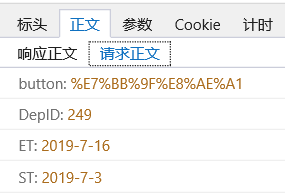
请求参数:
请求参数
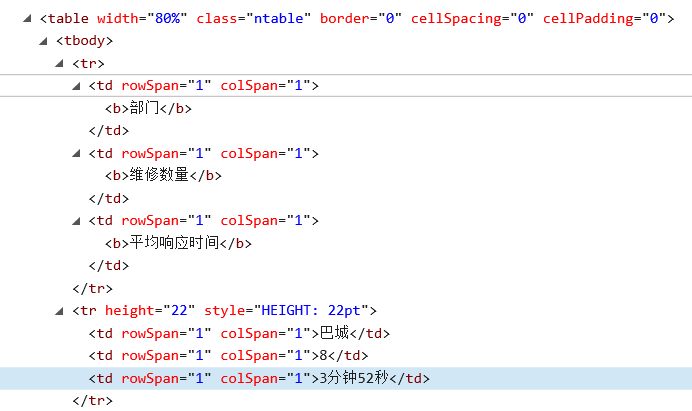
正确获得的html内容:
需要的html
网页界面:
网页界面

|
|
 ( 粤ICP备18085999号-1 | 粤公网安备 44051102000585号)


 狗仔卡
狗仔卡 发表于 2019-7-16 16:04:15
 置顶卡
置顶卡 千斤顶
千斤顶 显身卡
显身卡 发表于 2019-7-16 16:40:42
 楼主
楼主