|
|
10鱼币
import re
import os, sys
try:
from tkinter import *
except ImportError: #Python 2.x
PythonVersion = 2
from Tkinter import *
from tkFont import Font
from ttk import *
#Usage:showinfo/warning/error,askquestion/okcancel/yesno/retrycancel
from tkMessageBox import *
#Usage:f=tkFileDialog.askopenfilename(initialdir='E:/Python')
#import tkFileDialog
#import tkSimpleDialog
else: #Python 3.x
PythonVersion = 3
from tkinter.font import Font
from tkinter.ttk import *
from tkinter.messagebox import *
#import tkinter.filedialog as tkFileDialog
#import tkinter.simpledialog as tkSimpleDialog #askstring()
class Application_ui(Frame):
#这个类仅实现界面生成功能,具体事件处理代码在子类Application中。
def __init__(self, master=None):
Frame.__init__(self, master)
self.master.title('自动关机')
self.master.geometry('519x135')
self.createWidgets()
def createWidgets(self):
self.top = self.winfo_toplevel()
self.style = Style()
self.Text1Var = StringVar(value='')
self.Text1 = Entry(self.top, textvariable=self.Text1Var, font=('宋体',9))
self.Text1.place(relx=0.293, rely=0.119, relwidth=0.449, relheight=0.304)
self.style.configure('Command1.TButton',font=('宋体',9))
self.Command1 = Button(self.top, text='确定', command=self.Command1_Cmd, style='Command1.TButton')
self.Command1.place(relx=0.123, rely=0.593, relwidth=0.326, relheight=0.304)
self.style.configure('Label1.TLabel',anchor='w', font=('宋体',22))
self.Label1 = Label(self.top, text='系统将在', style='Label1.TLabel')
self.Label1.place(relx=0.015, rely=0.178, relwidth=0.249, relheight=0.244)
self.style.configure('Label2.TLabel',anchor='w', font=('宋体',22))
self.Label2 = Label(self.top, text='秒后关机', style='Label2.TLabel')
self.Label2.place(relx=0.755, rely=0.178, relwidth=0.295, relheight=0.244)
self.style.configure('Command2.TButton',font=('宋体',9))
self.Command2 = Button(self.top, text='取消', command=self.Command2_Cmd, style='Command2.TButton')
self.Command2.place(relx=0.493, rely=0.593, relwidth=0.31, relheight=0.304)
class Application(Application_ui):
#这个类实现具体的事件处理回调函数。界面生成代码在Application_ui中。
def __init__(self, master=None):
Application_ui.__init__(self, master)
def Command1_Cmd(self, event=None):
num=self.Text1Var.get()
try:
res = float(num)
cmd="shutdown -s -t "+num
os.system(cmd)
wd="系统将在"+num+"秒后关机!按取消键取消"
showinfo(title = '提示', message = wd)
pass
except ValueError as e:
showinfo(title = '提示', message = '请输入数字')
raise
finally:
pass
def Command2_Cmd(self, event=None):
wd2="shutdown -a"
os.system(wd2)
showinfo(title='提示',message='已经取消')
pass
if __name__ == "__main__":
top = Tk()
Application(top).mainloop()
try: top.destroy()
except: pass
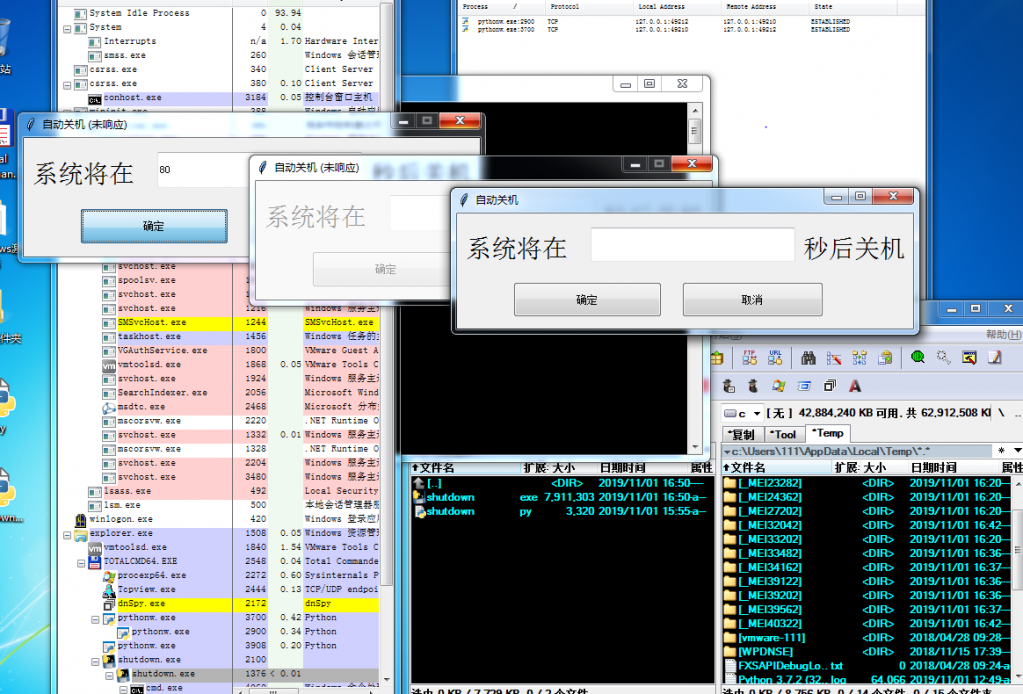
大佬们,这代码有问题吗,为什么在idle里面功能是正常的,pyinstall -F -w 编译后功能什么的都不好用了
|
-
|
 ( 粤ICP备18085999号-1 | 粤公网安备 44051102000585号)


 狗仔卡
狗仔卡 发表于 2019-11-1 17:03:56
 置顶卡
置顶卡 千斤顶
千斤顶 显身卡
显身卡