鱼C论坛

 找回密码
 立即注册
查看: 2356|回复: 10

大家帮我看看这个问题

[复制链接]
发表于 2020-2-24 20:05:11 | 显示全部楼层 |阅读模式

马上注册,结交更多好友,享用更多功能^_^

您需要 登录 才可以下载或查看,没有账号?立即注册

x
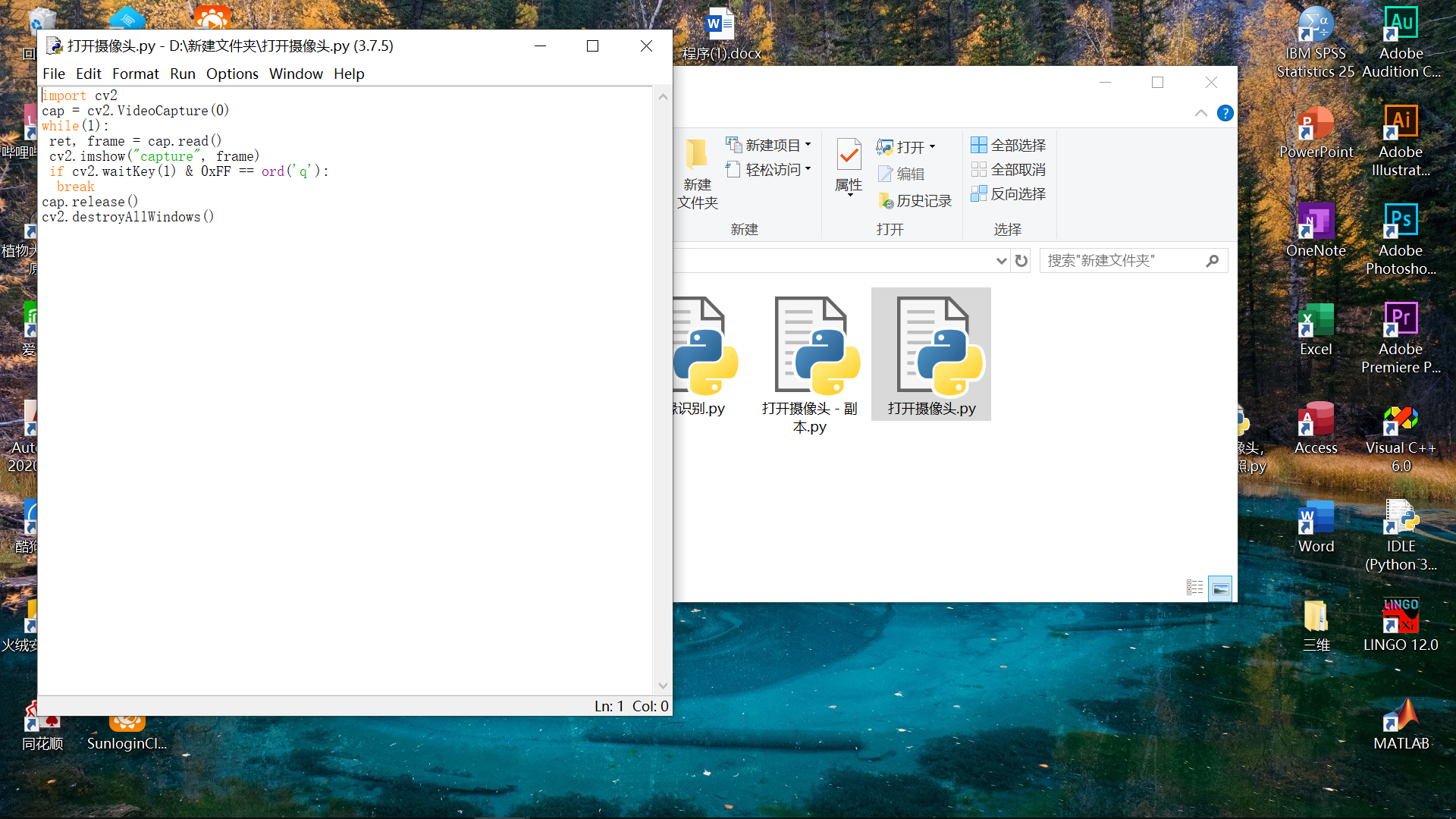
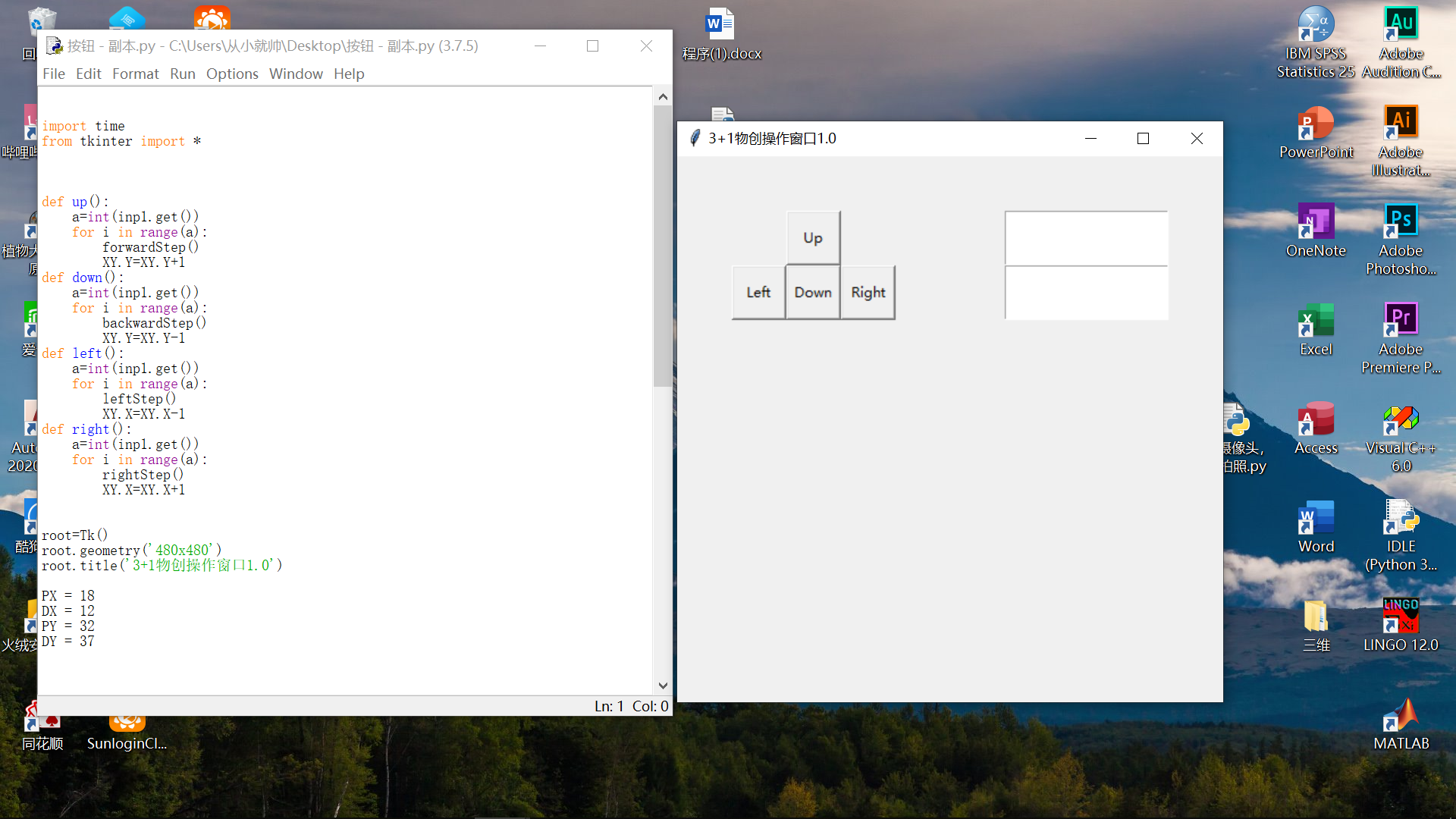
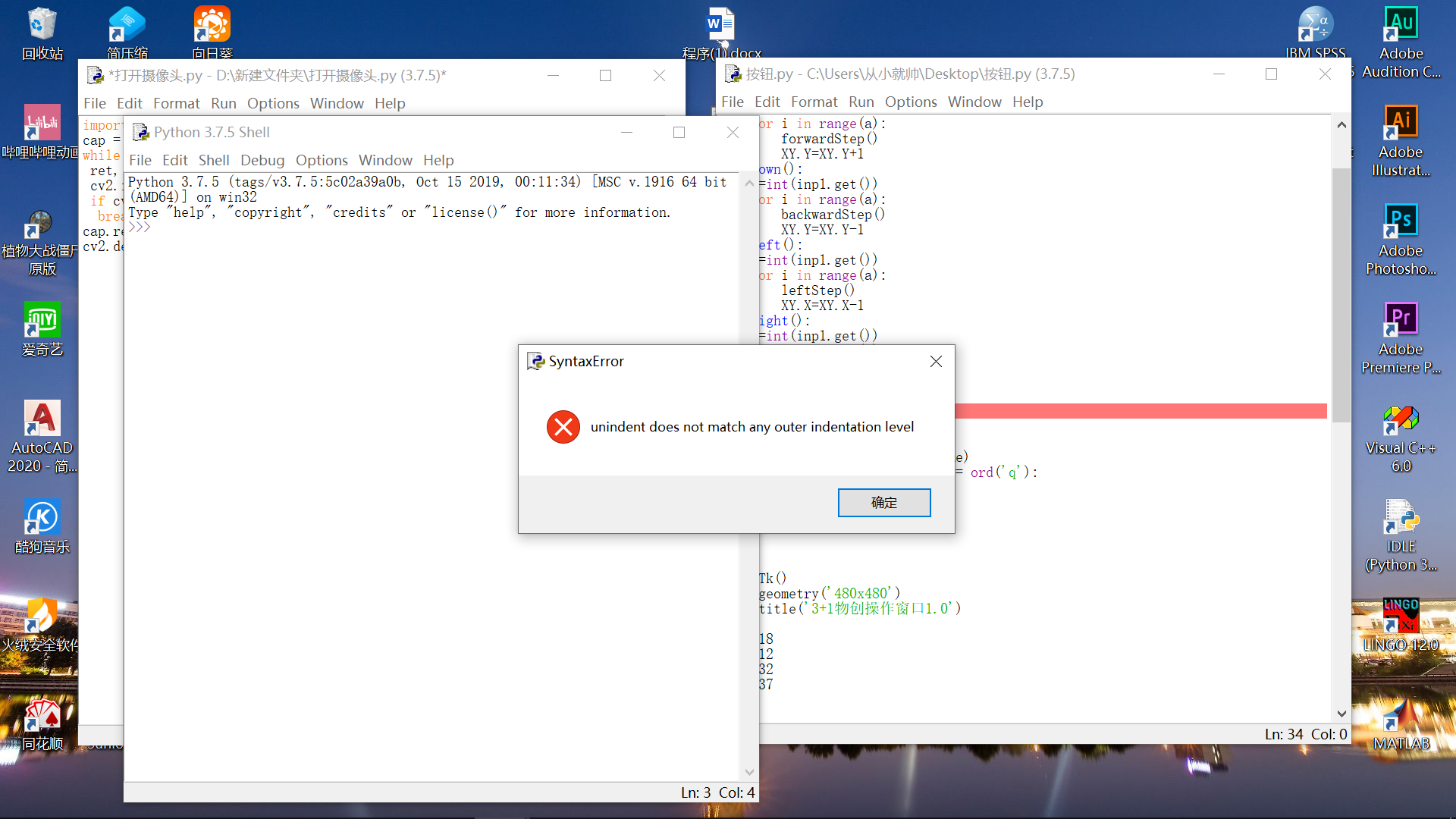
看图片,第一张图片是打开电脑的摄像头,第二张是生产一个按钮界面,单独运行时都可以,但是想把两个合并成一个的时候就出问题了(见图)是出什么问题了呀?
2.png
3.png
1.png
小甲鱼最新课程 -> https://ilovefishc.com
回复

使用道具 举报

发表于 2020-2-24 20:11:16 From FishC Mobile | 显示全部楼层
缩进问题
小甲鱼最新课程 -> https://ilovefishc.com
回复 支持 反对

使用道具 举报

 楼主| 发表于 2020-2-24 20:37:28 | 显示全部楼层

要怎么改才正确呀?
小甲鱼最新课程 -> https://ilovefishc.com
回复 支持 反对

使用道具 举报

发表于 2020-2-24 20:38:31 From FishC Mobile | 显示全部楼层
末日之泪 发表于 2020-2-24 20:37
要怎么改才正确呀?

代码都不发,谁知道呢
小甲鱼最新课程 -> https://ilovefishc.com
回复 支持 1 反对 0

使用道具 举报

发表于 2020-2-24 20:40:08 | 显示全部楼层
发代码好吧,这样有利于别人解决你的问题
小甲鱼最新课程 -> https://ilovefishc.com
回复 支持 反对

使用道具 举报

 楼主| 发表于 2020-2-24 21:25:02 | 显示全部楼层
蒋博文 发表于 2020-2-24 20:40
发代码好吧,这样有利于别人解决你的问题
  1. import cv2
  2. import time
  3. from tkinter import *
  4. def up():
  5.     a=int(inp1.get())
  6.     for i in range(a):
  7.         forwardStep()
  8.         XY.Y=XY.Y+1
  9. def down():
  10.     a=int(inp1.get())
  11.     for i in range(a):
  12.         backwardStep()
  13.         XY.Y=XY.Y-1
  14. def left():
  15.     a=int(inp1.get())
  16.     for i in range(a):
  17.         leftStep()
  18.         XY.X=XY.X-1
  19. def right():
  20.     a=int(inp1.get())
  21.     for i in range(a):
  22.         rightStep()
  23.         XY.X=XY.X+1


  24.    


  25. root=Tk()
  26. root.geometry('480x480')
  27. root.title('3+1物创操作窗口1.0')

  28. PX = 18
  29. DX = 12
  30. PY = 32
  31. DY = 37


  32. btn1=Button(root,text='Up',command=up) #up
  33. btn1.place(relx=0.2, rely=0.1, relwidth=0.1, relheight=0.1)
  34. btn2=Button(root,text='Down',command=down) #down
  35. btn2.place(relx=0.2, rely=0.2, relwidth=0.1, relheight=0.1)
  36. btn3=Button(root,text='Left',command=left) #left
  37. btn3.place(relx=0.1, rely=0.2, relwidth=0.1, relheight=0.1)
  38. btn4=Button(root,text='Right',command=right) #right
  39. btn4.place(relx=0.3, rely=0.2, relwidth=0.1, relheight=0.1)
  40. inp1=Entry(root)  #distance
  41. inp1.place(relx=0.6, rely=0.1, relwidth=0.3, relheight=0.1)
  42. inp2=Entry(root) #time
  43. inp2.place(relx=0.6, rely=0.2, relwidth=0.3, relheight=0.1)


  44. btn5=Button(root,text='Back Origin',command=move) #back
  45. btn5.place(relx=0.3, rely=0.8, relwidth=0.2, relheight=0.1)
  46. btn6=Button(root,text='Zero',command=zero) #
  47. btn6.place(relx=0.2, rely=0.6, relwidth=0.1, relheight=0.1)

  48. btn7=Button(root,text='Back ',command=back) #move
  49. btn7.place(relx=0.6, rely=0.8, relwidth=0.1, relheight=0.1)
  50. btn8=Button(root,text='Repeat',command=Repeat) #repeatbtn8.place(relx=0.8, rely=0.8, relwidth=0.1, relheight=0.1)


  51. lab1=Label(root,text="Length:")
  52. lab1.place(relx=0.4, rely=0.1, relwidth=0.2, relheight=0.1)
  53. lab2=Label(root,text="Speed:")
  54. lab2.place(relx=0.4, rely=0.2, relwidth=0.2, relheight=0.1)


  55. lab3=Label(root,text='')
  56. lab3.pack(padx=1,pady=206)
  57. getxy()

  58. lab4=Label(root,text="Coordinate:")
  59. lab4.place(relx=0.2, rely=0.4, relwidth=0.2, relheight=0.1)

  60. cap = cv2.VideoCapture(0)
  61. while(1):
  62. ret, frame = cap.read()
  63. cv2.imshow("capture", frame)
  64. if cv2.waitKey(1) & 0xFF == ord('q'):
  65.   break
  66. root.bind("<Key>",Key)
  67. root.mainloop()
  68. cap.release()
  69. cv2.destroyAllWindows()
复制代码

现在可以运起来了,但是只有按钮界面,摄像头界面没有,是什么问题呀?
小甲鱼最新课程 -> https://ilovefishc.com
回复 支持 反对

使用道具 举报

 楼主| 发表于 2020-2-24 21:26:26 | 显示全部楼层
wp231957 发表于 2020-2-24 20:38
代码都不发,谁知道呢
  1. import cv2
  2. import time
  3. from tkinter import *
  4. def up():
  5.     a=int(inp1.get())
  6.     for i in range(a):
  7.         forwardStep()
  8.         XY.Y=XY.Y+1
  9. def down():
  10.     a=int(inp1.get())
  11.     for i in range(a):
  12.         backwardStep()
  13.         XY.Y=XY.Y-1
  14. def left():
  15.     a=int(inp1.get())
  16.     for i in range(a):
  17.         leftStep()
  18.         XY.X=XY.X-1
  19. def right():
  20.     a=int(inp1.get())
  21.     for i in range(a):
  22.         rightStep()
  23.         XY.X=XY.X+1


  24.    


  25. root=Tk()
  26. root.geometry('480x480')
  27. root.title('3+1物创操作窗口1.0')

  28. PX = 18
  29. DX = 12
  30. PY = 32
  31. DY = 37


  32. btn1=Button(root,text='Up',command=up) #up
  33. btn1.place(relx=0.2, rely=0.1, relwidth=0.1, relheight=0.1)
  34. btn2=Button(root,text='Down',command=down) #down
  35. btn2.place(relx=0.2, rely=0.2, relwidth=0.1, relheight=0.1)
  36. btn3=Button(root,text='Left',command=left) #left
  37. btn3.place(relx=0.1, rely=0.2, relwidth=0.1, relheight=0.1)
  38. btn4=Button(root,text='Right',command=right) #right
  39. btn4.place(relx=0.3, rely=0.2, relwidth=0.1, relheight=0.1)
  40. inp1=Entry(root)  #distance
  41. inp1.place(relx=0.6, rely=0.1, relwidth=0.3, relheight=0.1)
  42. inp2=Entry(root) #time
  43. inp2.place(relx=0.6, rely=0.2, relwidth=0.3, relheight=0.1)


  44. btn5=Button(root,text='Back Origin',command=move) #back
  45. btn5.place(relx=0.3, rely=0.8, relwidth=0.2, relheight=0.1)
  46. btn6=Button(root,text='Zero',command=zero) #
  47. btn6.place(relx=0.2, rely=0.6, relwidth=0.1, relheight=0.1)

  48. btn7=Button(root,text='Back ',command=back) #move
  49. btn7.place(relx=0.6, rely=0.8, relwidth=0.1, relheight=0.1)
  50. btn8=Button(root,text='Repeat',command=Repeat) #repeatbtn8.place(relx=0.8, rely=0.8, relwidth=0.1, relheight=0.1)


  51. lab1=Label(root,text="Length:")
  52. lab1.place(relx=0.4, rely=0.1, relwidth=0.2, relheight=0.1)
  53. lab2=Label(root,text="Speed:")
  54. lab2.place(relx=0.4, rely=0.2, relwidth=0.2, relheight=0.1)


  55. lab3=Label(root,text='')
  56. lab3.pack(padx=1,pady=206)
  57. getxy()

  58. lab4=Label(root,text="Coordinate:")
  59. lab4.place(relx=0.2, rely=0.4, relwidth=0.2, relheight=0.1)

  60. cap = cv2.VideoCapture(0)
  61. while(1):
  62. ret, frame = cap.read()
  63. cv2.imshow("capture", frame)
  64. if cv2.waitKey(1) & 0xFF == ord('q'):
  65.   break
  66. root.bind("<Key>",Key)
  67. root.mainloop()
  68. cap.release()
  69. cv2.destroyAllWindows()
复制代码

现在可以运起来了,但是摄像头部分还是打不开,是什么问题啊?
小甲鱼最新课程 -> https://ilovefishc.com
回复 支持 反对

使用道具 举报

发表于 2020-2-24 21:42:42 | 显示全部楼层
本帖最后由 蒋博文 于 2020-2-24 21:43 编辑
末日之泪 发表于 2020-2-24 21:26
现在可以运起来了,但是摄像头部分还是打不开,是什么问题啊?


你的缩进呢
小甲鱼最新课程 -> https://ilovefishc.com
回复 支持 反对

使用道具 举报

 楼主| 发表于 2020-2-24 21:55:21 | 显示全部楼层

两个单独运都可以,但是在一起摄像头的就不行了,缩进实在看不出来怎么改了,要怎么改才能摄像头和那个界面一起出现啊?
小甲鱼最新课程 -> https://ilovefishc.com
回复 支持 反对

使用道具 举报

发表于 2020-2-24 21:56:28 | 显示全部楼层
末日之泪 发表于 2020-2-24 21:55
两个单独运都可以,但是在一起摄像头的就不行了,缩进实在看不出来怎么改了,要怎么改才能摄像头和那个界 ...

我看错了
小甲鱼最新课程 -> https://ilovefishc.com
回复 支持 反对

使用道具 举报

 楼主| 发表于 2020-2-24 22:06:03 | 显示全部楼层

那要怎么改呢?
小甲鱼最新课程 -> https://ilovefishc.com
回复 支持 反对

使用道具 举报

您需要登录后才可以回帖 登录 | 立即注册

本版积分规则

小黑屋|手机版|Archiver|鱼C工作室 ( 粤ICP备18085999号-1 | 粤公网安备 44051102000585号)

GMT+8, 2026-1-22 20:06

Powered by Discuz! X3.4

© 2001-2023 Discuz! Team.

快速回复 返回顶部 返回列表