|
|
马上注册,结交更多好友,享用更多功能^_^
您需要 登录 才可以下载或查看,没有账号?立即注册
x
本帖最后由 糖逗 于 2026-3-9 16:01 编辑
1. 中间件的作用?
中间件的作用是对智能体的每一步工作进行控制和自定义的执行。
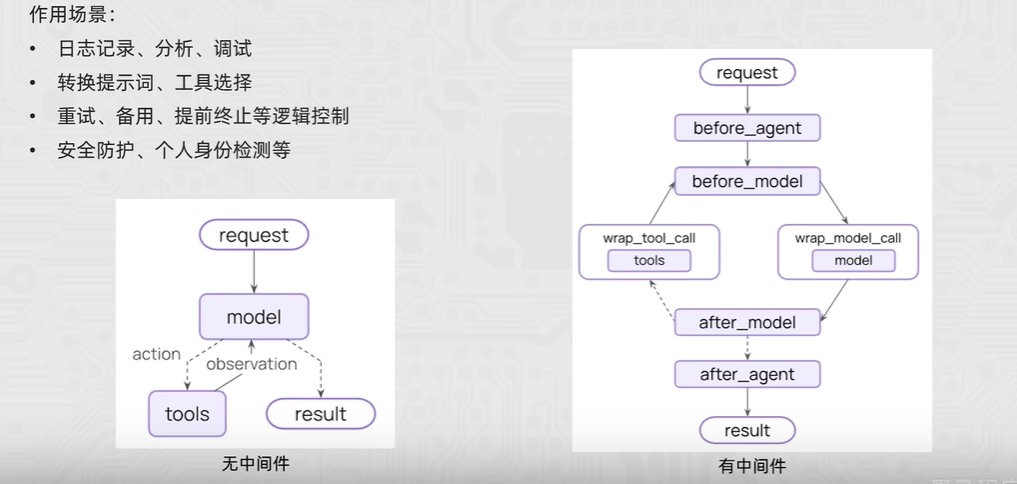
LangChain中内置了一些基础的中间件:https://docs.langchain.com/oss/python/langchain/middlewarre/built-in
2. 中间件可以嵌入在哪些节点中?
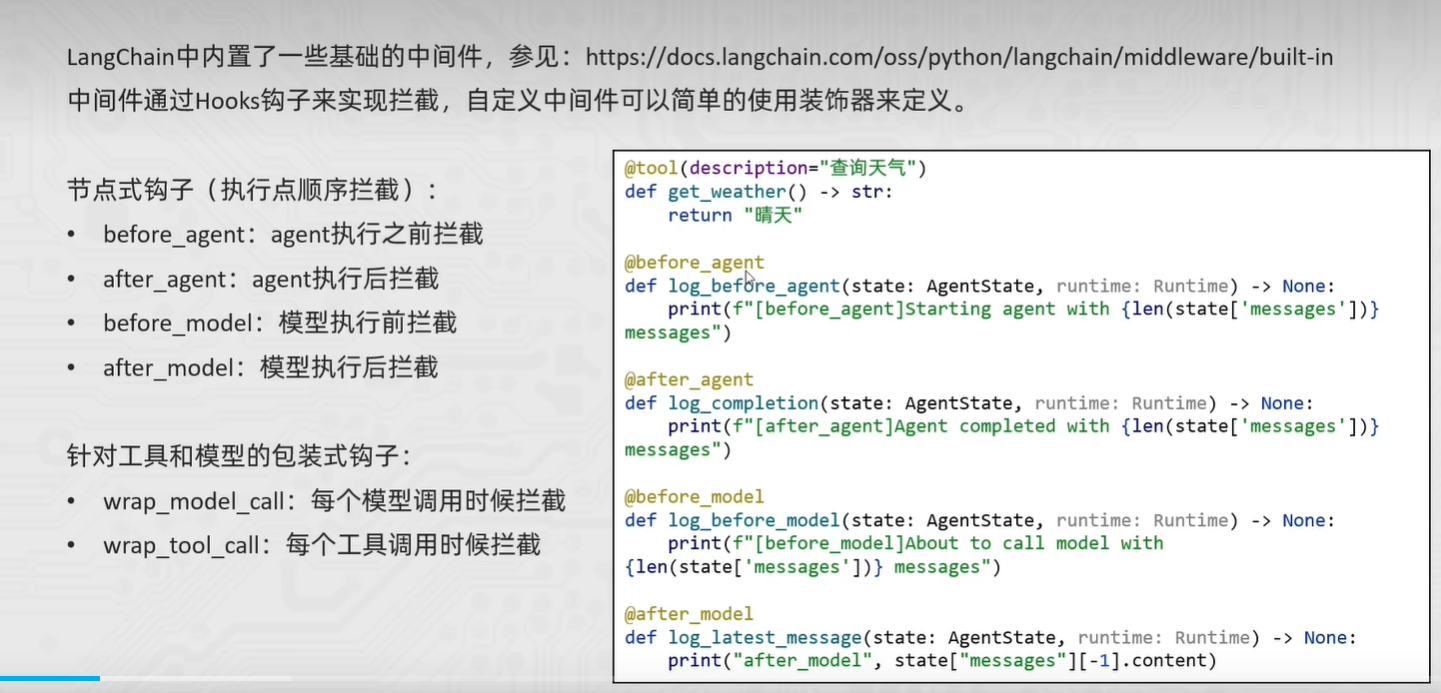
3.代码实战
- from typing import Dict, Any, List
- from uuid import UUID
- from langchain.agents import create_tool_calling_agent, AgentExecutor
- from langchain_openai import ChatOpenAI
- from langchain_core.tools import tool
- from langchain_core.prompts import ChatPromptTemplate, MessagesPlaceholder
- from langchain_core.callbacks import BaseCallbackHandler
- from langchain_core.outputs import LLMResult
- # ================= 2. 定义工具 =================
- @tool(description="查询天气,传入城市名称字符串,返回字符串天气信息")
- def get_weather(city: str) -> str:
- return f"{city}天气:晴天"
- # ================= 3. 【核心修改】自定义回调处理器 (替代旧版 Middleware) =================
- class MyCustomHandler(BaseCallbackHandler):
- """
- 自定义回调类,通过重写以下方法来实现 before/after 的逻辑
- """
-
- # 对应: Agent 启动
- def on_chain_start(self, serialized: Dict[str, Any], inputs: Dict[str, Any], **kwargs: Any) -> Any:
- print(f"[before agent] agent启动,并附带消息")
- # 对应: Agent 结束
- def on_chain_end(self, outputs: Dict[str, Any], **kwargs: Any) -> Any:
- print(f"[after agent] agent结束")
- # 对应: Model 执行前
- def on_llm_start(self, serialized: Dict[str, Any], prompts: List[str], **kwargs: Any) -> Any:
- print(f"[before_model] 模型即将调用")
- print("模型调用啦")
- # 对应: Model 执行后
- def on_llm_end(self, response: LLMResult, **kwargs: Any) -> Any:
- print(f"[after_model] 模型调用结束")
- # 对应: Tool 执行前
- def on_tool_start(self, serialized: Dict[str, Any], input_str: str, **kwargs: Any) -> Any:
- tool_name = kwargs.get('name', 'unknown_tool')
- print(f"工具执行:{tool_name}")
- print(f"工具执行传入参数:{input_str}")
- # ================= 4. 初始化模型和 Agent =================
- llm = ChatOpenAI(
- model="qwen-max",
- temperature=0,
- openai_api_base="https://dashscope.aliyuncs.com/compatible-mode/v1",
- )
- prompt = ChatPromptTemplate.from_messages([
- ("system", "你是一个天气助手。"),
- ("human", "{input}"),
- MessagesPlaceholder(variable_name="agent_scratchpad"),
- ])
- agent = create_tool_calling_agent(llm=llm, tools=[get_weather], prompt=prompt)
- agent_executor = AgentExecutor(agent=agent, tools=[get_weather], verbose=False)
- # ================= 5. 执行并传入回调 =================
- # 在这里把我们写好的 Handler 传进去
- my_handler = MyCustomHandler()
- print("--- 开始运行 ---")
- res = agent_executor.invoke(
- {"input": "深圳今天的天气如何呀,如何穿衣"},
- config={"callbacks": [my_handler]}
- )
- print("\n**********\n最终结果:", res["output"])
|
|
 ( 粤ICP备18085999号-1 | 粤公网安备 44051102000585号)


 狗仔卡
狗仔卡 发表于 2026-3-9 12:43:43
 置顶卡
置顶卡 千斤顶
千斤顶 显身卡
显身卡