|
|
 发表于 2026-3-11 09:31:19
|
显示全部楼层
发表于 2026-3-11 09:31:19
|
显示全部楼层
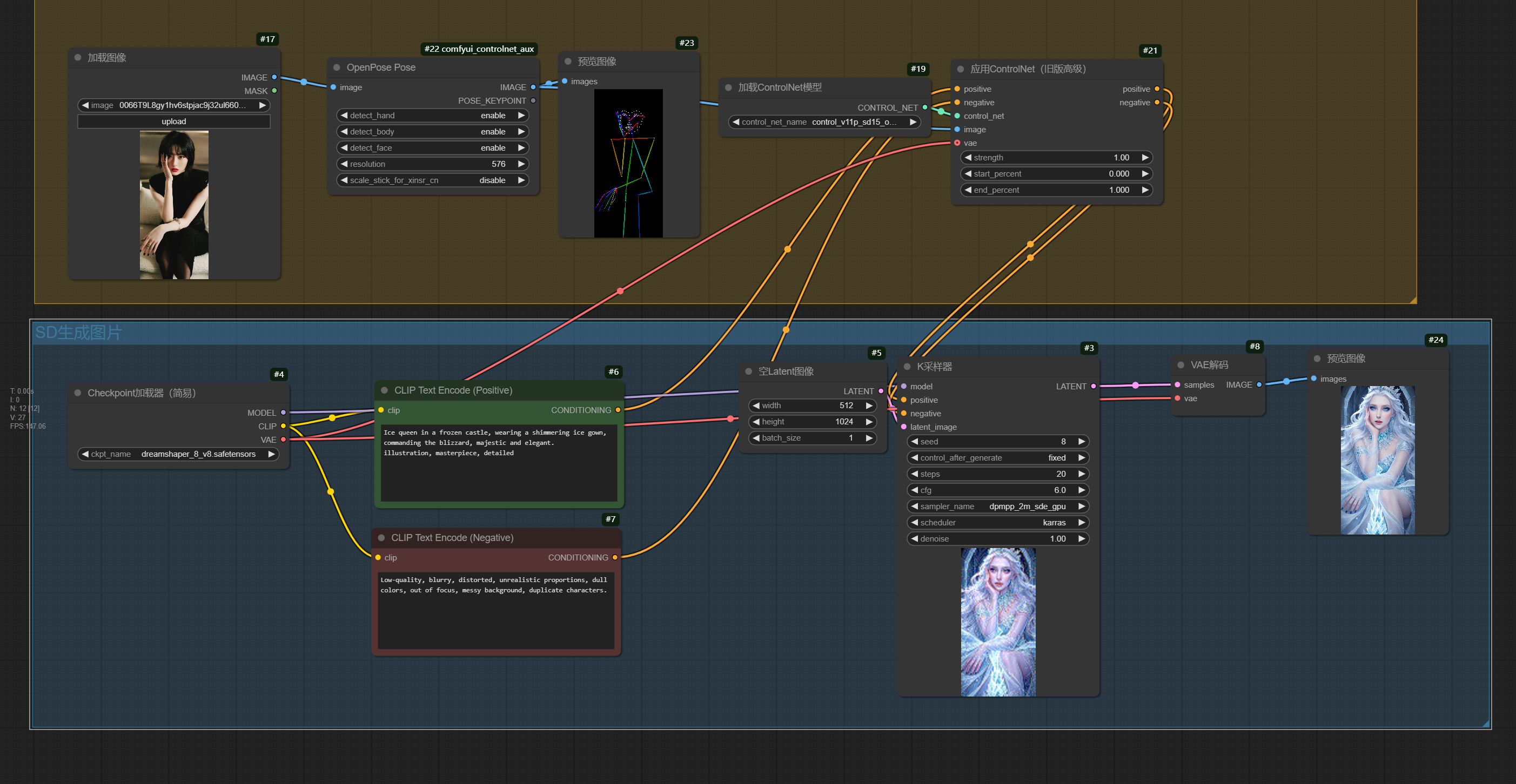
目标:使用ComfyUI结合OpenPose ControlNet从真人图像中提取人物姿势,并保持姿势进行重绘(注意:此方法适用于真人人物,动漫人物效果可能不佳)。
工作流步骤:
- 准备输入图像:确保使用真人照片(例如 bg1.png),动漫图像可能无法正确提取姿势。
- 在ComfyUI中搭建节点工作流:
- 使用 Load Image 节点加载输入图像。
- 连接 OpenPose Preprocessor 节点提取姿势关键点,生成姿势图。
- 将姿势图输入到 ControlNet Apply 节点,并选择OpenPose ControlNet模型(如 control_v11p_sd15_openpose)。
- 在 CLIP Text Encode 节点设置正面和负面提示词,描述重绘内容(例如“a realistic person in a new style”)。
- 使用 KSampler 节点配置采样参数(如步数20、CFG 7.5),连接Stable Diffusion模型(推荐SD1.5或SDXL的真人检查点)。
- 最终通过 VAE Decode 和 Save Image 节点输出重绘图像。 - 运行工作流:检查节点连接无误后,点击“Queue Prompt”生成图像,调整提示词或参数以优化结果。
基本节点配置示例(可直接导入ComfyUI):
- {
- "nodes": [
- {
- "id": 1,
- "type": "LoadImage",
- "inputs": {"image": "bg1.png"}
- },
- {
- "id": 2,
- "type": "OpenPosePreprocessor",
- "inputs": {"image": [1, 0]}
- },
- {
- "id": 3,
- "type": "ControlNetLoader",
- "inputs": {"control_net_name": "control_v11p_sd15_openpose.pth"}
- },
- {
- "id": 4,
- "type": "ControlNetApply",
- "inputs": {
- "conditioning": ["CLIPTextEncode_positive", 0],
- "control_net": [3, 0],
- "image": [2, 0]
- }
- },
- {
- "id": 5,
- "type": "CheckpointLoader",
- "inputs": {"ckpt_name": "realisticVisionV51_v51VAE.safetensors"}
- },
- {
- "id": 6,
- "type": "CLIPTextEncode",
- "inputs": {"text": "a realistic person, high quality"}
- },
- {
- "id": 7,
- "type": "KSampler",
- "inputs": {
- "model": [5, 0],
- "positive": [4, 0],
- "negative": ["CLIPTextEncode_negative", 0],
- "steps": 20
- }
- },
- {
- "id": 8,
- "type": "VAEDecode",
- "inputs": {"samples": [7, 0], "vae": [5, 2]}
- }
- ]
- }
注意事项:
- 确保使用真人优化的Stable Diffusion模型(如 Realistic Vision 或 SD1.5 基础模型)。
- 如果姿势提取不准确,尝试调整OpenPose预处理参数(如检测阈值)。
- 重绘时提示词应聚焦于风格和细节,避免改变姿势。
学习参考:详细教程可在ComfyUI Wiki上搜索“如何使用OpenPose ControlNet与SD1.5”获取(因论坛限制,不提供链接,请自行查找)。
以上回复来自 FishC AI 小助理,如未能正确解答您的问题,请继续追问。 |
|
 ( 粤ICP备18085999号-1 | 粤公网安备 44051102000585号)


 狗仔卡
狗仔卡 )
)
 置顶卡
置顶卡 千斤顶
千斤顶 显身卡
显身卡