|
|
马上注册,结交更多好友,享用更多功能^_^
您需要 登录 才可以下载或查看,没有账号?立即注册
x
- import pygame
- import random
- import sys
- import os
- # ===================== 基础配置 =====================
- pygame.init()
- pygame.mixer.init()
- GRID_SIZE = 40
- BOARD_LINE = 15
- BOARD_WIDTH = GRID_SIZE * (BOARD_LINE - 1)
- PADDING = 30
- WINDOW_W = BOARD_WIDTH + PADDING * 2
- WINDOW_H = BOARD_WIDTH + PADDING * 2 + 60
- # 颜色
- WHITE = (255, 255, 255)
- BLACK = (0, 0, 0)
- BOARD_COLOR = (220, 179, 92)
- RED = (200, 0, 0)
- BLUE = (0, 0, 200)
- GRAY = (180, 180, 180)
- HOVER_COLOR = (150, 150, 150)
- # 窗口 & 字体
- screen = pygame.display.set_mode((WINDOW_W, WINDOW_H))
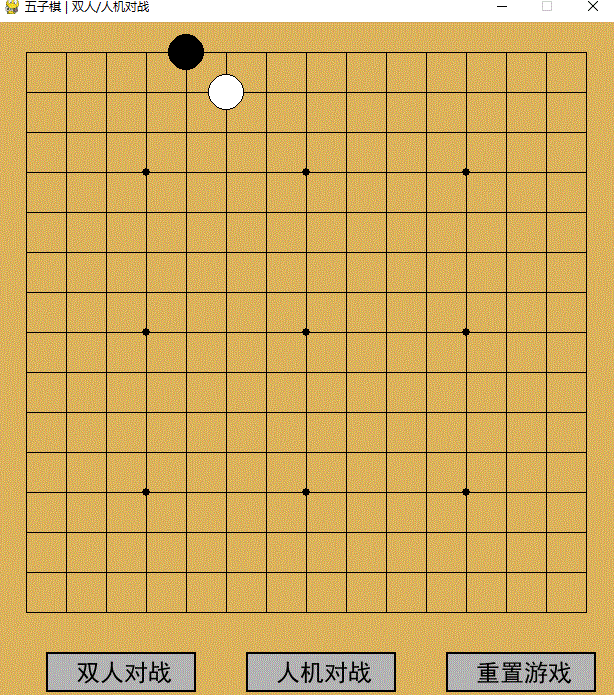
- pygame.display.set_caption("五子棋 | 双人/人机对战")
- def get_chinese_font(size=24):
- font_path = "C:/Windows/Fonts/simhei.ttf"
- if os.path.exists(font_path):
- return pygame.font.Font(font_path, size)
- return pygame.font.Font(None, size)
- font = get_chinese_font(24)
- big_font = get_chinese_font(48)
- # 音乐音效(找不到文件自动跳过)
- place_sound = win_sound = lose_sound = None
- try:
- pygame.mixer.music.load("anything/bg_music.mp3")
- pygame.mixer.music.set_volume(0.3)
- pygame.mixer.music.play(-1)
- except:
- pass
- try:
- place_sound = pygame.mixer.Sound("anything/place.wav")
- win_sound = pygame.mixer.Sound("anything/win.wav")
- lose_sound = pygame.mixer.Sound("anything/lose.wav")
- except:
- pass
- # 游戏状态
- board = [[0] * (BOARD_LINE - 1) for _ in range(BOARD_LINE - 1)]
- current_player = 1
- game_mode = 0
- game_over = False
- winner = 0
- # 按钮区域
- btn_1_rect = pygame.Rect(50, WINDOW_H - 50, 150, 40)
- btn_2_rect = pygame.Rect(250, WINDOW_H - 50, 150, 40)
- btn_reset_rect = pygame.Rect(450, WINDOW_H - 50, 150, 40)
- # 四个方向
- DIRS = [(1, 0), (0, 1), (1, 1), (1, -1)]
- # ===================== 绘制函数 =====================
- def draw_board():
- screen.fill(BOARD_COLOR)
- for i in range(BOARD_LINE):
- pygame.draw.line(screen, BLACK,
- (PADDING, PADDING + i * GRID_SIZE),
- (PADDING + BOARD_WIDTH, PADDING + i * GRID_SIZE), 1)
- pygame.draw.line(screen, BLACK,
- (PADDING + i * GRID_SIZE, PADDING),
- (PADDING + i * GRID_SIZE, PADDING + BOARD_WIDTH), 1)
- pos = [3, 7, 11]
- for x in pos:
- for y in pos:
- cx = PADDING + x * GRID_SIZE
- cy = PADDING + y * GRID_SIZE
- pygame.draw.circle(screen, BLACK, (cx, cy), 4)
- def draw_pieces():
- for x in range(BOARD_LINE - 1):
- for y in range(BOARD_LINE - 1):
- val = board[x][y]
- if val == 0:
- continue
- cx = PADDING + x * GRID_SIZE
- cy = PADDING + y * GRID_SIZE
- radius = GRID_SIZE // 2 - 2
- if val == 1:
- pygame.draw.circle(screen, BLACK, (cx, cy), radius)
- else:
- pygame.draw.circle(screen, WHITE, (cx, cy), radius)
- pygame.draw.circle(screen, BLACK, (cx, cy), radius, 1)
- def draw_buttons():
- mp = pygame.mouse.get_pos()
- # 双人
- c = HOVER_COLOR if btn_1_rect.collidepoint(mp) else GRAY
- pygame.draw.rect(screen, c, btn_1_rect)
- pygame.draw.rect(screen, BLACK, btn_1_rect, 2)
- t = font.render("双人对战", True, BLACK)
- screen.blit(t, (btn_1_rect.x + 30, btn_1_rect.y + 8))
- # 人机
- c = HOVER_COLOR if btn_2_rect.collidepoint(mp) else GRAY
- pygame.draw.rect(screen, c, btn_2_rect)
- pygame.draw.rect(screen, BLACK, btn_2_rect, 2)
- t = font.render("人机对战", True, BLACK)
- screen.blit(t, (btn_2_rect.x + 30, btn_2_rect.y + 8))
- # 重置
- c = HOVER_COLOR if btn_reset_rect.collidepoint(mp) else GRAY
- pygame.draw.rect(screen, c, btn_reset_rect)
- pygame.draw.rect(screen, BLACK, btn_reset_rect, 2)
- t = font.render("重置游戏", True, BLACK)
- screen.blit(t, (btn_reset_rect.x + 30, btn_reset_rect.y + 8))
- def draw_win_popup():
- if not game_over:
- return
- overlay = pygame.Surface((WINDOW_W, WINDOW_H), pygame.SRCALPHA)
- overlay.fill((0, 0, 0, 180))
- screen.blit(overlay, (0, 0))
- rect = pygame.Rect(WINDOW_W//2-150, WINDOW_H//2-80, 300, 160)
- pygame.draw.rect(screen, WHITE, rect)
- pygame.draw.rect(screen, BLACK, rect, 3)
- if winner == 1:
- txt = big_font.render("黑棋获胜!", True, BLACK)
- elif winner == 2:
- txt = big_font.render("白棋获胜!", True, BLACK)
- else:
- txt = big_font.render("平局!", True, BLACK)
- screen.blit(txt, (rect.centerx - txt.get_width()//2, rect.y + 30))
- tip = font.render("点击任意位置继续", True, BLACK)
- screen.blit(tip, (rect.centerx - tip.get_width()//2, rect.y + 100))
- # ===================== 逻辑 & 增强AI =====================
- def get_mouse_pos(pos):
- x, y = pos
- xi = round((x - PADDING) / GRID_SIZE)
- yi = round((y - PADDING) / GRID_SIZE)
- if 0 <= xi < BOARD_LINE-1 and 0 <= yi < BOARD_LINE-1:
- return xi, yi
- return -1, -1
- def is_win(x, y, player):
- for dx, dy in DIRS:
- cnt = 1
- nx, ny = x+dx, y+dy
- while 0<=nx<BOARD_LINE-1 and 0<=ny<BOARD_LINE-1 and board[nx][ny]==player:
- cnt +=1
- nx += dx
- ny += dy
- nx, ny = x-dx, y-dy
- while 0<=nx<BOARD_LINE-1 and 0<=ny<BOARD_LINE-1 and board[nx][ny]==player:
- cnt +=1
- nx -= dx
- ny -= dy
- if cnt >=5:
- return True
- return False
- # 评估单个点位分数(核心AI算法)
- def eval_point(x, y, player):
- score = 0
- enemy = 1 if player == 2 else 2
- for dx, dy in DIRS:
- # 向一侧延伸
- p1, e1, b1 = 0, 0, 0
- nx, ny = x+dx, y+dy
- while 0<=nx<BOARD_LINE-1 and 0<=ny<BOARD_LINE-1:
- if board[nx][ny] == player:
- p1 +=1
- elif board[nx][ny] == enemy:
- e1 +=1
- break
- else:
- b1 +=1
- break
- nx += dx
- ny += dy
- # 另一侧延伸
- p2, e2, b2 = 0, 0, 0
- nx, ny = x-dx, y-dy
- while 0<=nx<BOARD_LINE-1 and 0<=ny<BOARD_LINE-1:
- if board[nx][ny] == player:
- p2 +=1
- elif board[nx][ny] == enemy:
- e2 +=1
- break
- else:
- b2 +=1
- break
- nx -= dx
- ny -= dy
- total_p = p1 + p2
- total_e = e1 + e2
- # 计分规则(五子棋棋型权重)
- if total_p >=4:
- score += 100000 # 五连,必胜
- elif total_p ==3:
- if e1==0 and e2==0:
- score += 10000 # 活四
- elif e1==0 or e2==0:
- score += 5000 # 冲四
- elif total_p ==2:
- if e1==0 and e2==0:
- score += 1000 # 活三
- elif e1==0 or e2==0:
- score += 500 # 眠三
- elif total_p ==1:
- if e1==0 and e2==0:
- score += 100 # 活二
- else:
- score += 50
- # 靠近棋盘中心加分(优先占天元/星位)
- cx = (BOARD_LINE-2) // 2
- cy = (BOARD_LINE-2) // 2
- dis = abs(x-cx) + abs(y-cy)
- score += (20 - dis) * 2
- return score
- # 强化AI:全局选最优点
- def ai_play():
- best_score = -1
- best_pos = None
- # 遍历所有空位
- for x in range(BOARD_LINE-1):
- for y in range(BOARD_LINE-1):
- if board[x][y] != 0:
- continue
- # 1. AI自己进攻分数
- board[x][y] = 2
- s1 = eval_point(x, y, 2)
- # 2. 防守:玩家在此落子的分数(必须堵)
- s2 = eval_point(x, y, 1)
- total = s1 + s2 * 1.2 # 防守权重略高
- board[x][y] = 0
- if total > best_score:
- best_score = total
- best_pos = (x, y)
- if best_pos:
- x, y = best_pos
- board[x][y] = 2
- if place_sound:
- place_sound.play()
- def reset_game():
- global board, current_player, game_over, winner
- board = [[0]*(BOARD_LINE-1) for _ in range(BOARD_LINE-1)]
- current_player = 1
- game_over = False
- winner = 0
- # ===================== 主循环 =====================
- def main():
- global current_player, game_mode, game_over, winner
- clock = pygame.time.Clock()
- running = True
- while running:
- clock.tick(60)
- draw_board()
- draw_pieces()
- draw_buttons()
- draw_win_popup()
- for event in pygame.event.get():
- if event.type == pygame.QUIT:
- running = False
- # 胜负弹窗点击重置
- if game_over and event.type == pygame.MOUSEBUTTONDOWN:
- reset_game()
- continue
- # 按钮点击
- if event.type == pygame.MOUSEBUTTONDOWN:
- mx, my = pygame.mouse.get_pos()
- if btn_1_rect.collidepoint((mx, my)):
- game_mode = 1
- reset_game()
- elif btn_2_rect.collidepoint((mx, my)):
- game_mode = 2
- reset_game()
- elif btn_reset_rect.collidepoint((mx, my)):
- reset_game()
- # R键重置
- if event.type == pygame.KEYDOWN:
- if event.key == pygame.K_r:
- reset_game()
- # 棋盘落子
- if event.type == pygame.MOUSEBUTTONDOWN and not game_over and game_mode != 0:
- mx, my = pygame.mouse.get_pos()
- x, y = get_mouse_pos((mx, my))
- if x == -1 or y == -1 or board[x][y] != 0:
- continue
- if game_mode == 1:
- # 双人模式
- board[x][y] = current_player
- if place_sound:
- place_sound.play()
- if is_win(x, y, current_player):
- game_over = True
- winner = current_player
- if winner == 1 and win_sound:
- win_sound.play()
- elif winner == 2 and lose_sound:
- lose_sound.play()
- current_player = 2 if current_player == 1 else 1
- else:
- # 人机模式
- if current_player == 1:
- board[x][y] = 1
- if place_sound:
- place_sound.play()
- if is_win(x, y, 1):
- game_over = True
- winner = 1
- if win_sound:
- win_sound.play()
- else:
- # AI落子
- ai_play()
- # 检测AI是否获胜
- win_flag = False
- for i in range(BOARD_LINE-1):
- for j in range(BOARD_LINE-1):
- if board[i][j] == 2 and is_win(i, j, 2):
- game_over = True
- winner = 2
- win_flag = True
- if lose_sound:
- lose_sound.play()
- break
- if win_flag:
- break
- pygame.display.update()
- pygame.quit()
- sys.exit()
- if __name__ == "__main__":
- main()
|
-
评分
-
查看全部评分
|
 ( 粤ICP备18085999号-1 | 粤公网安备 44051102000585号)


 狗仔卡
狗仔卡 发表于 2026-6-9 23:31:49
 置顶卡
置顶卡 千斤顶
千斤顶 显身卡
显身卡 发表于 2026-6-9 23:32:09