|
|
马上注册,结交更多好友,享用更多功能^_^
您需要 登录 才可以下载或查看,没有账号?立即注册
x
本帖最后由 miles0918 于 2014-10-26 17:00 编辑
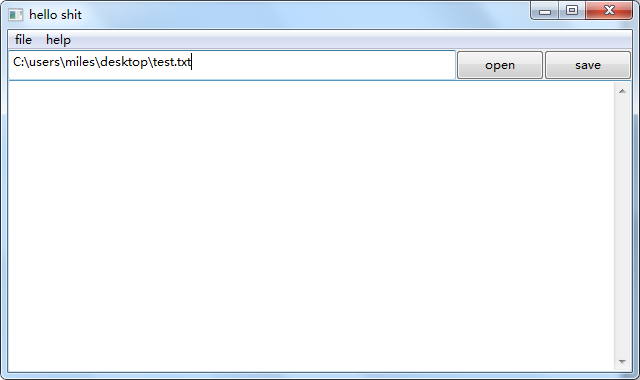
如题,主界面和其他内容正常显示。
但是输入文件路径点击Load Button出问题,提示,如下:
Traceback (most recent call last):
File "test_panel.py", line 60, in OnOpen
file_value = path_text.GetValue()
NameError: global name 'path_text' is not defined
第60行:file_value = path_text.GetValue()这里有调用错误吗?
- import wx
- class MyFrame(wx.Frame):
- def __init__(self, title):
- wx.Frame.__init__(self, parent = None, title = title, size = (640, 380))
- self.Bind(wx.EVT_CLOSE, self.OnClose)
- # create menubar and file menu.
- menuBar = wx.MenuBar()
- file_menu = wx.Menu()
- menuBar.Append(file_menu, "file")
- # create items in the file menu.
- exit_item = file_menu.Append(wx.ID_EXIT, "exit")
- self.Bind(wx.EVT_MENU, self.OnClose, exit_item)
- # help menu.
- help_menu = wx.Menu()
- about_item = help_menu.Append(wx.ID_ABOUT, "about")
- menuBar.Append(help_menu, "help")
- self.Bind(wx.EVT_MENU, self.OnAbout, about_item)
- panel = wx.Panel(self)
- open_button = wx.Button(parent = panel, label = 'open')
- save_button = wx.Button(parent = panel, label = 'save')
- path_text = wx.TextCtrl(parent = panel)
- content_text = wx.TextCtrl(panel, style = wx.TE_MULTILINE)
- self.Bind(wx.EVT_BUTTON, self.OnOpen, open_button)
- self.Bind(wx.EVT_BUTTON, self.OnSave, save_button)
- a_sizer = wx.BoxSizer(wx.HORIZONTAL)
- a_sizer.Add(path_text, proportion = 1, flag = wx.EXPAND)
- a_sizer.Add(open_button, proportion = 0, border = 5)
- a_sizer.Add(save_button, proportion = 0, border = 5)
- b_sizer = wx.BoxSizer(wx.VERTICAL)
- b_sizer.Add(a_sizer, proportion = 0, flag = wx.EXPAND, border = 5)
- b_sizer.Add(content_text, proportion = 1, flag = wx.EXPAND)
- panel.SetSizer(b_sizer)
- self.SetMenuBar(menuBar)
- def OnClose(self, evt):
- dlg = wx.MessageDialog(self, "Do you really want to close this application?",
- "confirm exit", wx.OK | wx.CANCEL)
- result = dlg.ShowModal()
- dlg.Destroy()
- if result == wx.ID_OK:
- self.Destroy()
- def OnAbout(self, evt):
- dlg = wx.MessageDialog(self, "notepad\nVersion:\t1.0")
- dlg.ShowModal()
- dlg.Destroy()
- def OnOpen(self, evt):
- file_value = path_text.GetValue()
- file_obj = open(file_value)
- content_text.SetValue(file_obj.read())
- file_obj.close()
- def OnSave(self, evt):
- file_value = path_text.GetValue()
- content = self.content_text.GetValue()
- file_obj = open(file_value, 'w')
- file_obj.write(content)
- file_obj.close()
- def main():
- app = wx.App()
- frame = MyFrame('hello shit')
- frame.Show()
- app.MainLoop()
- if __name__ == "__main__":
- main()
|
-
点击open后无法正常打开文件
|
 ( 粤ICP备18085999号-1 | 粤公网安备 44051102000585号)


 狗仔卡
狗仔卡 发表于 2014-10-25 21:57:03

 置顶卡
置顶卡 千斤顶
千斤顶 显身卡
显身卡 楼主
楼主