|
|
马上注册,结交更多好友,享用更多功能^_^
您需要 登录 才可以下载或查看,没有账号?立即注册
x
首先我下载好了压缩包phantomjs 解压了并添加了环境变量
命令行中输入 phantomjs -v 显示2-1-1
说明安装成功的
第①个问题:
我写了一个js文件 名字是 hello.js 内容如下:
console.log('Hello, world!');
phantom.exit();
我在windows命令行中输入
phantomjs C:\Users\Administrator\Desktop\hello.js 注(C:\Users\Administrator\Desktop\ 这是我桌面路径)
它输出 hello world!
这是可以的
但是 我如果不输路径就报错
它报 Can't open 'hello.js' 错误 这是什么原因我用python打开文件 也是差不多输 python hello.py 就能打开 这是我环境变量设置少了吗
第2个问题:
还有一个如果我先进到phantomjs里面 就是说我在命令行中输入phantomjs
然后命令行就变成 phantomjs>的样子了
然后输入C:\Users\Administrator\Desktop\hello.js 或者是hello.js
他报错
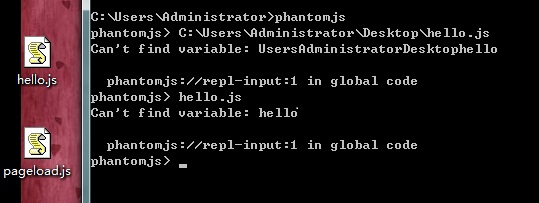 该怎么解决
该怎么解决
第3个问题:
我运行页面加载和屏幕捕获两个程序 获取不到图片 代码如下:
var page = require('webpage').create();
page.open('http://cuiqingcai.com', function (status) {
console.log("Status: " + status);
if (status === "success") {
page.render('example.png');
}
phantom.exit();
});
输出 为status :success
但是没图片
这个是屏幕捕捉 也没图片
var page = require('webpage').create();
//viewportSize being the actual size of the headless browser
page.viewportSize = { width: 1024, height: 768 };
//the clipRect is the portion of the page you are taking a screenshot of
page.clipRect = { top: 0, left: 0, width: 1024, height: 768 };
//the rest of the code is the same as the previous example
page.open('http://cuiqingcai.com/', function() {
page.render('germy.png');
phantom.exit();
});
这个输出没
|
|
 ( 粤ICP备18085999号-1 | 粤公网安备 44051102000585号)


 狗仔卡
狗仔卡 发表于 2016-11-27 18:39:40
 置顶卡
置顶卡 千斤顶
千斤顶 显身卡
显身卡 楼主
楼主


 代码没问题 就是 那个网址有问题 那个网页博主 把博客弄得太好了 一些图片的转动啊什么的 ajax动态的什么 加载太久 截不出图来 换个百度主页什么的 一下就保存下来了