|
|
马上注册,结交更多好友,享用更多功能^_^
您需要 登录 才可以下载或查看,没有账号?立即注册
x
想做一个简单的记账程序,可是生成顶层窗口之后,这个提交按钮为什么自己就运行,没有点他就运行指定的函数。求解
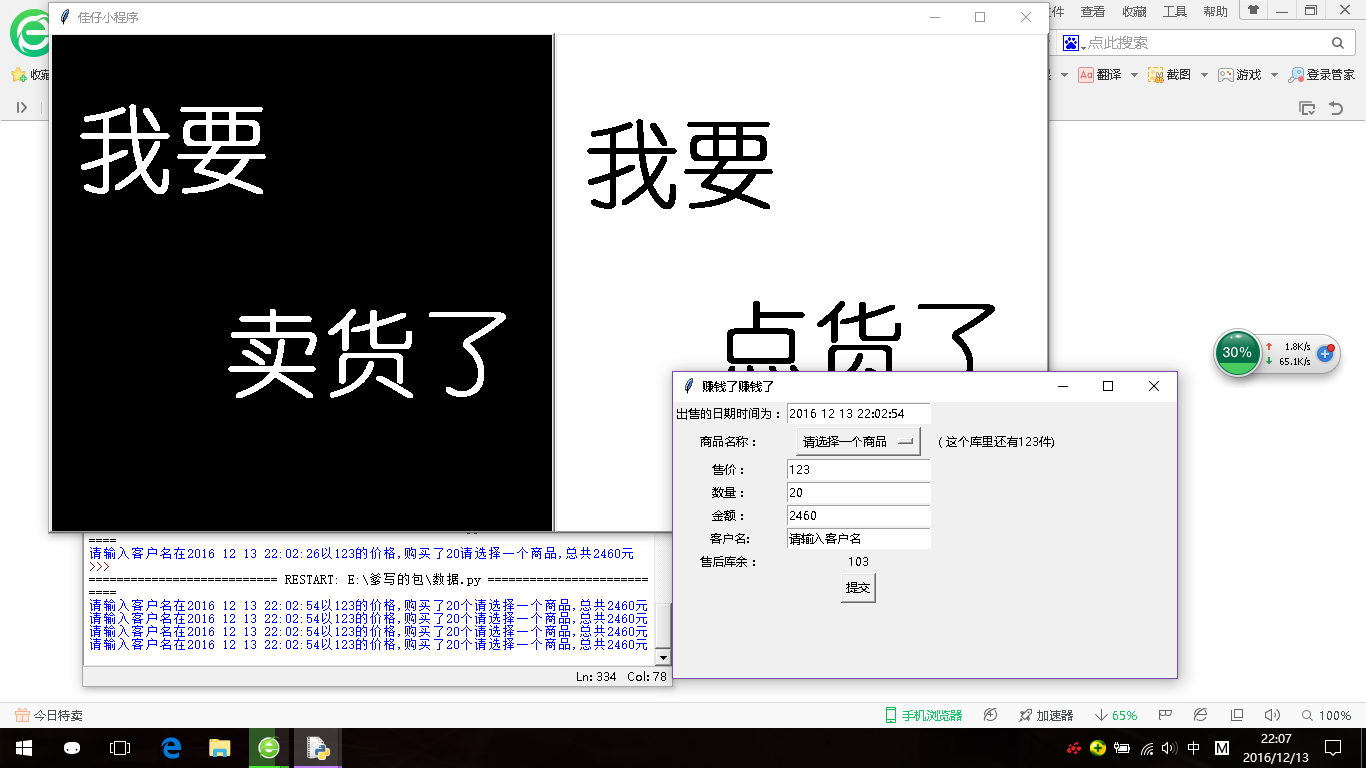
- import tkinter as tk
- import time
- root=tk.Tk()
- root.geometry('1000x500+10+10')
- root.title('佳仔小程序')
- sell=tk.PhotoImage(file='sell.gif')
- test=tk.PhotoImage(file='test.gif')
- ISOTIMEFORRMAT='%Y %m %d %X'
- date=time.strftime(ISOTIMEFORRMAT)
- date_value=tk.StringVar()
- date_value.set(date)
- def sell_commodity(root):#商品的下拉列表
- commodity_list=['棒棒糖','棉花糖','跳跳糖']
- v=tk.StringVar(root)
- v.set('请选择一个商品')
- commodity_opm=tk.OptionMenu(root,v,*commodity_list)
- commodity_opm.grid(row=2,column=2)
- return v.get()
- def sell_huoyu(root,commodity):
- tk.Label(root,text='(这个库里还有%s件)'%commodity).grid(row=2,column=3)
- return commodity
- def sell_howmuch(root):
- money=tk.IntVar()
- money.set(123)
- money_frame=tk.Entry(root,textvariable=money)
- money_frame.grid(row=3,column=2)
- return money.get()
- def sell_number(root):
- num=tk.IntVar()
- num.set(20)
- num_frame=tk.Entry(root,textvariable=num)
- num_frame.grid(row=4,column=2)
- number=num.get()
- return number
- def sell_money(root,howmuch,number):
- money=tk.IntVar()
- money.set(howmuch*number)
- sell_money_frame=tk.Entry(root,textvariable=money)
- sell_money_frame.grid(row=5,column=2)
- return money.get()
- def sell_man(root):
- man=tk.StringVar()
- man.set('请输入客户名')
- man_frame=tk.Entry(root,textvariable=man)
- man_frame.grid(row=6,column=2)
- return man.get()
- def sell_after(root,befroe,num):
- after_huoyu=int(befroe)-int(num)
- tk.Label(root,text=after_huoyu).grid(row=7,column=2)
- def sell_check(man,time,howmuch,number,commodity,money):
- print('%s在%s以%s的价格,购买了%s个%s,总共%s元'%(man,time,howmuch,number,commodity,money))
- def create():#创建顶层窗口
- top=tk.Toplevel()
- top.geometry('1000x500+10+10')
- top.title('赚钱了赚钱了')
- tk.Label(top,text='出售的日期时间为:').grid(row=0,column=1)
- tk.Entry(top,textvariable=date_value).grid(row=0,column=2)
- irow=2
- for each in ['商品名称:','售价:','数量:','金额:','客户名:','售后库余:']:
- tk.Label(top,text=each,anchor=tk.E).grid(row=irow,column=1)
- irow+=1
- #商品下拉列表 #库余label
- commodity=sell_commodity(top)
- huoyu=sell_huoyu(top,commodity=123)
- #价格entry
- howmuch=sell_howmuch(top)
- #数量entry
- number=sell_number(top)
- #金额entry
- money=sell_money(top,howmuch,number)
- #客户entry
- man=sell_man(top)
- #售后库余label
- if type(number)==int:
- sell_after(top,huoyu,number)
- #提交按钮Button
- check=tk.Button(top,text='提交',\
- command=sell_check(man,date_value.get(),howmuch,number,commodity,money))
- check.grid(row=8,column=2)
- l1=tk.Button(root,image=sell,command=create)
- l1.pack(fill =tk. Y, side = tk.LEFT)
- l2=tk.Button(root,image=test,command=create)
- l2.pack(fill=tk.Y,side=tk.RIGHT)
-
-
- root.mainloop()
def cmd_selchk():
sell_check(man,date_value.get(),howmuch,number,commodity,money)
def create():#创建顶层窗口
……
#提交按钮Button
check=tk.Button(top,text='提交',
command=cmd_selchk)[/code]
|
|
 ( 粤ICP备18085999号-1 | 粤公网安备 44051102000585号)


 狗仔卡
狗仔卡 发表于 2016-12-13 22:32:33
 置顶卡
置顶卡 千斤顶
千斤顶 显身卡
显身卡
