|
|
30鱼币
本帖最后由 304079992 于 2016-12-25 21:40 编辑
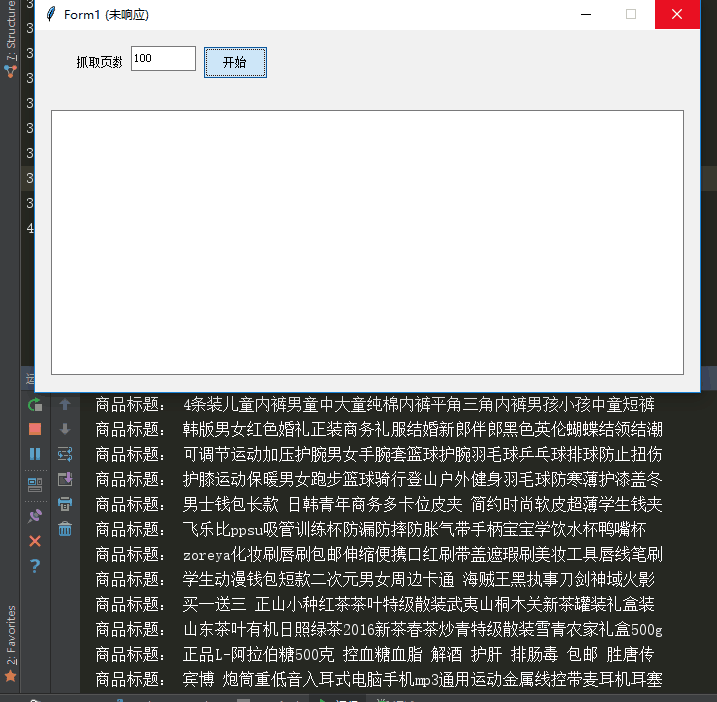
想实现的是,在爬去页面内容的过程中,同时也输出内容到tkinter界面中。
想问的问题有两个,
1、爬去的过程中,tkinter界面会变成假死状态
2、我只知道用return返回数据到tkinter里,但是return在for循环中会跳出只输出了一句
请各位大神指点下,给点思路,本人新手刚学
- import urllib.request
- import json
- def ShopData(end_page):
- for page in range(1,end_page+1):
- # 商品链接
- ShopUrl = 'http://api.dataoke.com/index.php?r=Port/index&type=total&appkey=w0q7z4fws7&v=2&page='+'end_page'
- # 获取页面数据并且进行JSON转码
- GoodsJson = json.loads(urllib.request.urlopen(ShopUrl).read().decode("utf-8"))
- # print(GoodsJson)
- '''
- 上面GoodsJson可拆分写成一下代码
- #打开商品链接
- goods = urllib.request.urlopen(shopUrl)
- #读取并且转码存储到
- goodsData = goods.read().decode("utf-8")
- #对Json数据进行解码
- goodsJson = json.loads(goodsData)
- '''
- for id in range(100):
- #获取所需要的数据
- title = GoodsJson["data"]["pageList"][id]["title"]
- print("商品标题:", title)
- #return title
- #!/usr/bin/env python
- #-*- coding:utf-8 -*-
- from main import *
- import os, sys
- try:
- from tkinter import *
- except ImportError: #Python 2.x
- PythonVersion = 2
- from Tkinter import *
- from tkFont import Font
- from ttk import *
- #Usage:showinfo/warning/error,askquestion/okcancel/yesno/retrycancel
- from tkMessageBox import *
- #Usage:f=tkFileDialog.askopenfilename(initialdir='E:/Python')
- #import tkFileDialog
- #import tkSimpleDialog
- else: #Python 3.x
- PythonVersion = 3
- from tkinter.font import Font
- from tkinter.ttk import *
- from tkinter.messagebox import *
- #import tkinter.filedialog as tkFileDialog
- #import tkinter.simpledialog as tkSimpleDialog #askstring()
- class Application_ui(Frame):
- #这个类仅实现界面生成功能,具体事件处理代码在子类Application中。
- def __init__(self, master=None):
- Frame.__init__(self, master)
- self.master.title('Form1')
- self.master.geometry('665x362')
- self.createWidgets()
- def createWidgets(self):
- self.top = self.winfo_toplevel()
- self.style = Style()
- self.Text1Var = StringVar(value='')
- self.Text1 = Entry(self.top, textvariable=self.Text1Var, font=('宋体',9))
- self.Text1.place(relx=0.144, rely=0.044, relwidth=0.098, relheight=0.069)
- self.style.configure('Label1.TLabel',anchor='w', font=('宋体',9))
- self.Label1 = Label(self.top, text='抓取页数', style='Label1.TLabel')
- self.Label1.place(relx=0.06, rely=0.066, relwidth=0.074, relheight=0.047)
- self.style.configure('Command1.TButton',font=('宋体',9))
- self.Command1 = Button(self.top, text='开始', command=self.Command1_Cmd, style='Command1.TButton')
- self.Command1.place(relx=0.253, rely=0.044, relwidth=0.098, relheight=0.091)
- self.Text2Var = StringVar(value='')
- self.Text2 = Entry(self.top, textvariable=self.Text2Var, font=('宋体',9))
- self.Text2.place(relx=0.024, rely=0.221, relwidth=0.952, relheight=0.732)
- class Application(Application_ui):
- #这个类实现具体的事件处理回调函数。界面生成代码在Application_ui中。
- def __init__(self, master=None):
- Application_ui.__init__(self, master)
- def Command1_Cmd(self, event=None):
- #TODO, Please finish the function here!
- end_page = self.Text1.get()
- self.Text2.insert(END,ShopData(int(end_page)))
- self.top.update()
- if __name__ == "__main__":
- top = Tk()
- Application(top).mainloop()
- try: top.destroy()
- except: pass
|
-
最佳答案
查看完整内容
多线程下载图片,以及 界面互动~
http://bbs.fishc.com/thread-74052-1-1.html
(出处: 鱼C论坛)
|
 ( 粤ICP备18085999号-1 | 粤公网安备 44051102000585号)


 狗仔卡
狗仔卡 发表于 2016-12-23 15:44:44
 置顶卡
置顶卡 千斤顶
千斤顶 显身卡
显身卡 发表于 2016-12-23 15:44:45
 楼主
楼主